



By Kayleigh Toyra
Guest Contributor
If you’re in the market to create a customized website to represent you or your business online, then you’re in luck. Website builders are now better than ever, and accessible even for those with no design or HTML experience whatsoever. Using a website builder like Squarespace, Jimdo, Wix, or Weebly, you can build a professional-looking website in relatively little time – with the option for more experienced users to fine tune the design as necessary.
The services listed above are at the top of their game right now, but which one comes out on top aesthetically? Below we’ve compared these four popular website builders, with a focus on look and feel.
Inspired by web design? Check out The Official Web Design Checklist: 50 Ways to Improve Your Website before building your own!
Squarespace

credit: collectivequarterly.com
Squarespace brands itself as the ultimate website builder for people who want to create portfolio sites and online stores. Its design templates are slick, contemporary, and mobile-responsive – arguably outranking those of its closest competitors. If you opt for the Business plan, you also have the ability to tweak the HTML/CSS as needed.
Compared to something like WordPress, the range of themes may appear quite small. However, there’s certainly enough to choose from. Something to bear in mind with Squarespace is that template quality can differ dramatically depending on the photography used.
Striking, professional imagery is recommended if you want to get the best out of Squarespace – but there’s no harm in having this anyway.
Squarespace also offers a wide selection of web fonts right out of the box; over 1,600 from Typekit and Google combined. Here are some examples of websites created with Squarespace.
Jimdo
credit: retropot.es
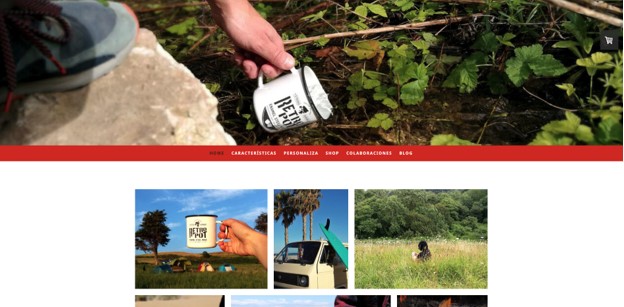
With its focus on ecommerce, Jimdo is a good candidate for a hassle-free website build. While it used to offer a selection of 120 design templates, one of the major complaints about Jimdo was that many of them weren’t mobile-responsive. The available options have since been cut right back to 15 – likely they will start to add more in future.
One of Jimdo’s unique attributes is its template selection procedure. Instead of choosing the design yourself, the Jimdo Dolphin wizard will ask you to select your niche, upload your business logo, and input any social channels. It then generates the most appropriate design template for your needs, even creating a color palette that matches your photos and other graphic elements. You can change these colors manually if preferred.
Jimdo has some template restrictions that can sometimes make it tricky to move things around. Luckily, you can play around with the free version beforehand to see if it works for you. Here are some examples of websites created with Jimdo.
Wix

credit: reutch.wixsite.com
The Wix website builder is very popular right now, offering simple software and web hosting that runs in your browser. Wix has more than 510 modern design templates and arguably the best drag-and-drop tool of the bunch. Over the last year, a real effort has been made to improve their range of themes and layouts, and while they may not match up to Squarespace just yet, they’re certainly on their way.
Wix has layouts to suit almost every small business niche, all of them editable using apps and optimized for mobile. For a basic website builder, the themes look pretty impressive, and there’s a huge library of professional graphics and photos at your disposal too. One of the benefits of choosing Wix over Squarespace is that if you don’t have the resources for a professional photo shoot, it won’t have such a marked impact on the appearance of your theme.
Here are some examples of websites created with Wix.
Weebly

credit: douksnow.com
Weebly is a very accessible website builder for beginners, requiring no knowledge of coding whatsoever. Like Wix, it has a drag-and-drop editing tool that allows you to put content where you like. Of the four website builders covered here, Weebly has suffered some of the most negative feedback around its templates. However, it’s getting better thanks to pressure from users.
It’s a close call between Wix and Weebly, but overall the Wix templates appear more versatile. With Weebly there are several preset layouts for different types of pages – even down to menu layouts – and to these you can add video or animated backgrounds. If necessary you can edit the source code to make changes; the biggest problem is there’s no way to make alterations on your mobile site. Here are some examples of websites created with Weebly.
In conclusion, if you’re looking for a simple website builder with a focus on good aesthetics, Squarespace and Wix are leading the charge right now with the widest range of versatile, mobile-responsive themes. Since both offer low-cost plans, why not try them out for yourself? For more details on other options, check out this in-depth review to find out more about website costs and plans.

Nordic marketer based in the UK. I love to delve in and explore a wide range of themes like storytelling and web development. I manage a small team of writers at a boutique agency.