



Since the release of Microsoft’s ChatGPT and Google Bard, professionals in various fields have wondered if AI will replace their jobs. The impact of AI in project management is a hot topic, with speculations about whether AI will ultimately replace them and when these changes might occur.
The COVID-19 pandemic has already led to some automation in project management, but the question remains: how much further will this trend go? Our investigation explores the opinions on the future of project manager positions in the face of AI’s potential dominance. Additionally, we have made a handpicked collection of identified the top five implications of AI development tools that you can use for running your daily project management tasks.
Transitioning Project Management: Embracing the AI Revolution
Project management has long relied on gathering and analyzing information to drive successful outcomes. However, the field is on the brink of a significant transformation, thanks to artificial intelligence (AI). Reputable research firm Gartner predicts that AI in project management will reshape the very core of the system in the coming years. This includes automating tasks such as information gathering, data collection, analysis, and report generation. Gartner also forecasts that technology companies will increasingly focus on developing digital platforms, AI solutions, and virtual reality technologies within the next few years.
These advancements will usher in a new era for project managers, providing them with improved and comprehensive programs. AI’s ability to swiftly analyze vast amounts of information will be a game-changer, offering powerful assistance in achieving company goals.
Gartner’s Vice President of Research is confident in AI’s potential but notes that most project managers and executives lack the tools to leverage AI effectively. Many companies must prepare for the digital age, needing essential equipment to harness AI’s full potential.
The Evolving Role of Project Managers in the Age of AI
In the age of AI, project managers will undergo a profound transformation in their roles. Carola Moresche explores this phenomenon in a blog titled “Project Management, Productivity, Leadership.” Moresche envisions a future where AI-driven analyses and decisions are crucial while the project manager becomes a creative force, resolving conflicts and driving innovation. According to Moresche, this shift will become the project manager’s primary responsibility. However, there is no need to fear this future. Christian Kaupa, Vice President of Insight and Data at Capgemini, emphasizes the essential role of human project managers in effectively coordinating AI. Despite its capabilities, AI cannot operate alone. Project managers facilitate collaboration between AI and AI experts, especially in complex, agile projects.
The future holds exciting prospects for project managers. As AI in project management takes on analytical tasks, project managers will become catalysts for creativity and innovation. Their expertise in integrating AI into project workflows will ensure successful outcomes for even the most intricate endeavors.
AI Project Management Tools
When selecting the ideal AI solution for your project management needs, consider the following checklist:
- Choose tools that utilize machine learning and natural language processing to automate tasks, analyze data, and make intelligent decisions, streamlining your project management process.
- Look for options with an intuitive user interface, ensuring easy adoption and maximum productivity without the need for extensive technical knowledge.
- Your AI system should be able to adapt to the unique requirements of each project. Seek customization options that allow integration with existing tools, promoting a smooth and cohesive workflow.
- Find an AI solution that encourages seamless communication among team members. It should facilitate task delegation, keep everyone on track, and offer document-sharing capabilities to enhance collaboration and transparency.
That said, let’s consider the AI project management tools that should facilitate daily routine and boost your productivity.
Project Planner
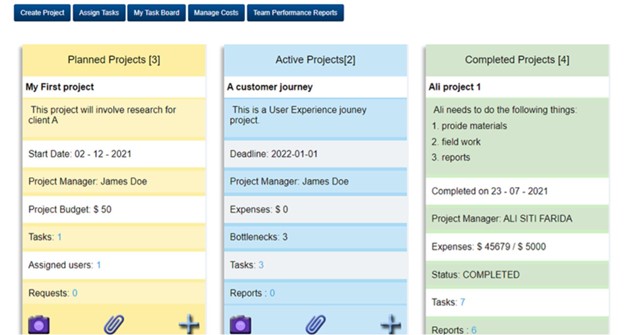
Project Planner is a versatile cloud-based project management software designed to streamline project processes. Its wide range of powerful features enhances productivity and collaboration among team members. With the introduction of PAI, an AI-powered project management software, Project Planner takes project management practices to new heights.
Key Features:
- Draft project proposals swiftly with AI assistance, saving time and ensuring accuracy in project planning.
- Stay informed with access to project status reports and performance data insights, enabling well-informed decision-making throughout the project lifecycle.
- Simplify task and document creation, and promote seamless team collaboration with PAI’s workflow automation.
- Optimize your team’s efficiency and productivity by automating resource allocation and task assignment with the power of AI.
- Effectively manage project costs and expenses by tracking spending and budgeting for future expenditures, ensuring better financial control.
- Keep all team members, stakeholders, and project managers updated on project progress at every step, promoting transparency and accountability.
Pricing: starting at $6/month per user; a free trial is available.
MonsterONE

Launching new websites and improving newly released web projects are everyday tasks for project managers. Everyone who has ever been involved in website redesign project planning knows how tedious the process may be. Deciding on the design of the future website and the functionality it should come bundled with are among the fundamental choices, which may take a lot of time and effort. In such cases, subscription services like MonsterONE come in handy.
MonsterONE is the ultimate subscription service, giving project managers quick access to high-quality web design assets, plugins, and graphics for different purposes and needs. Moreover, MonsterONE features that AI builder and AI website templates, letting project managers and their creative teams quickly generate texts and visual content.
Key features:
- Embrace the freedom of creativity with all subscription plans granting unlimited downloads of 315K+ digital assets. With unrestricted access to the entire collection, you can explore, experiment, and bring your visions to life without limitations.
- Your journey with MonsterONE is backed by a dedicated customer support team, ready to provide prompt assistance whenever needed. Regardless of your challenge, you can count on their guidance and expertise.
- MonsterONE goes beyond just providing a vast library. Subscribers also get access to special discounts and offers from partner companies, adding extra value to their creative endeavors.
- Budget constraints shouldn’t confine your creativity. MonsterONE offers a range of subscription plans to suit different needs and preferences. You can choose what works best for you, from affordable monthly plans to lifetime access options.
Pricing: starting at $24/mo; a free subscription plan is available.
Notion
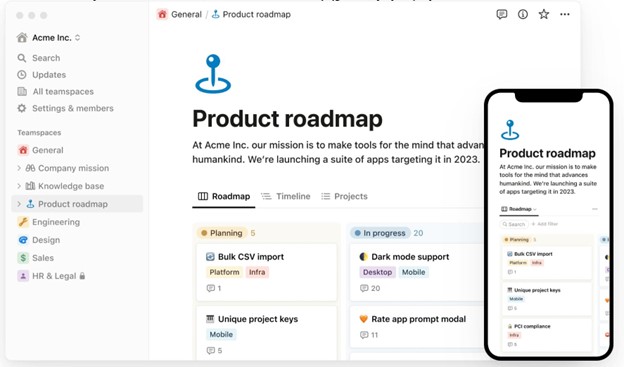
Notion is an all-in-one workspace tool that revolutionizes project management by integrating AI. With Notion, you can effortlessly create, share, and manage documents, tasks, notes, and workflows from a unified dashboard. Notion’s AI empowers you to optimize project management processes by efficiently prioritizing tasks. AI-powered task management automatically sorts tasks based on urgency and importance, generating new tasks upon completion of previous ones. Elevate your writing with Notion’s AI-enhanced editing. Benefit from automated grammar and style suggestions to enhance the quality of your work.
Key features:
- Stay connected with team members worldwide, enabling seamless communication and collaboration.
- Quickly access essential information with action items, takeaways, and summaries, ensuring efficient retrieval.
- Notion’s AI automates repetitive tasks, such as notifications and project status updates, allowing you to focus on higher-value activities.
- Personalized recommendations based on your usage patterns enhance productivity and efficiency.
- Experience the brilliance of AskNotion, a chatbot trained on your Notion pages and vast dataset, catering to your specific needs.
Pricing: $8/month per user; a free plan is available.
Kintone
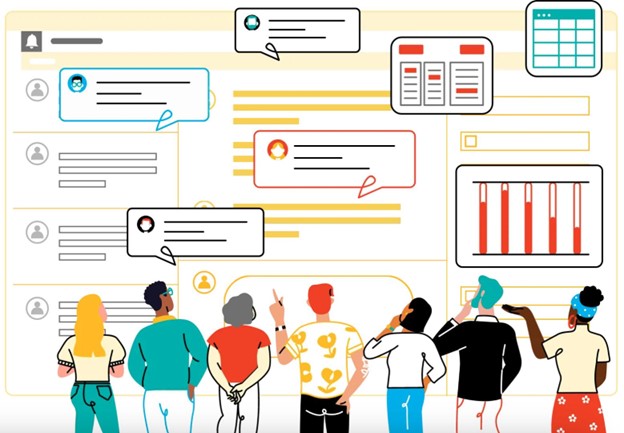
Kintone is a customizable cloud-based platform that revolutionizes how you manage tasks, communication, and data for your team. It is a robust low-code development environment, empowering you to build custom business applications and workflows, all within one central place. While Kintone may not be primarily an AI platform, it offers some remarkable AI-related features that enable you to automate and streamline tasks effortlessly. For instance, the visual application builder transforms static spreadsheets into dynamic, custom databases without requiring any coding expertise.
Key features:
- Leverage the power of machine learning algorithms to find the information you need swiftly. Kintone automatically categorizes data based on specific criteria, simplifying data organization and retrieval.
- Stay on top of crucial tasks and deadlines with smart notifications, eliminating the need for constant application monitoring. Kintone ensures you get all the essential updates.
- Uncover valuable patterns and trends to make more informed decisions using Kintone’s predictive analytics feature. Harnessing AI, this tool equips you with insights to drive your business forward.
- Even non-technical users will find Kintone a breeze to use, thanks to its natural language processing (NLP) capabilities. The user experience is intuitive and seamless, promoting efficiency across your team.
- Save time and resources with AI-driven customer service interactions. Kintone automates customer interactions, ensuring prompt and effective responses.
Pricing: $24/month per user
Hive
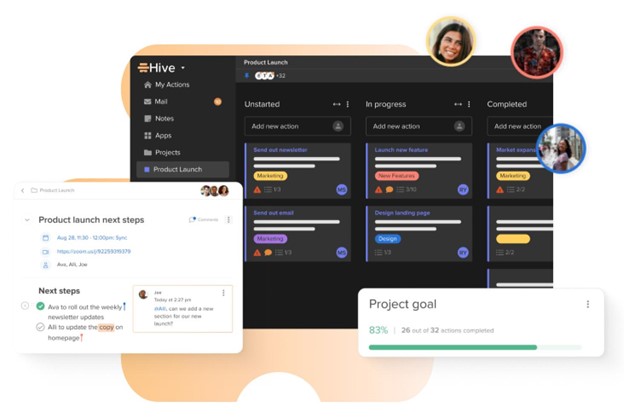
Hive is an AI-powered cloud-based project management platform that enhances team efficiency through automation and streamlined workflows. With Hive’s AI technology, project scheduling, resource allocation, and task prioritization have become more accessible. It also helps project managers and teams proactively identify risks and issues. Hive connects all aspects of work through its features, like flexible project layouts, file sharing, and group messaging. Furthermore, it seamlessly integrates with popular tools like Slack, Zoom, and Google Drive.
Key features:
- Use pre-built project management templates and customize them as per team requirements.
- It also automates repetitive tasks to boost productivity and save time.
- Team chat, comments, and @mentions facilitate real-time communication and collaboration.
- Project managers can monitor progress and track issues using Hive’s project tracking and reporting capabilities.
Pricing: $12/month per user; a free plan is also available.
In a Nutshell
Should we fear AI in project management will entirely replace human beings? No. This is a quick answer. The world is changing, and it’s wonderful that new technologies are being released. New solutions in professional niches are being introduced, making our lives easier and making us more productive at work. The AI project management tools are only some of the highlighted solutions we recommend you take a closer look at. Regardless of the industry you are working in, there are always AI development tools that should help you with your project management routine, be it AI web design tools or any other software.
Since the release of Microsoft’s ChatGPT and Google Bard, professionals in various fields have wondered if AI will replace their jobs. The impact of AI in project management is a hot topic, with speculations about whether AI will ultimately replace them and when these changes might occur.
The COVID-19 pandemic has already led to some automation in project management, but the question remains: how much further will this trend go? Our investigation explores the opinions on the future of project manager positions in the face of AI’s potential dominance. Additionally, we have made a handpicked collection of identified the top five implications of AI development tools that you can use for running your daily project management tasks.