


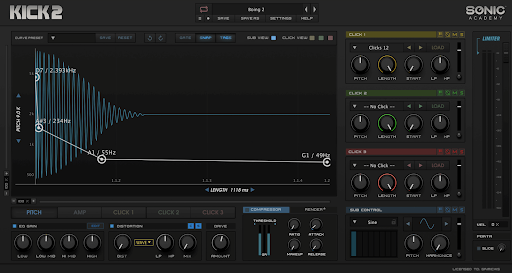
KICK 2 by Sonic Academy is a go-to tool for anyone diving into drum synthesis. Its advanced distortion options let you craft and tweak sounds, giving your kicks a unique edge.
In this article, we’ll walk you through how to make the most of these features to elevate your tracks.
Overview of Distortion Features in KICK 2
KICK 2 offers a variety of distortion types and parameters, giving you the flexibility to craft your ideal kick sound.
The distortion module includes the following.
- Clip: A hard-clipping algorithm that adds a sharp edge to the sound, perfect for aggressive genres.
- Tube: Emulates the warm saturation of a tube amplifier, adding harmonic richness and warmth.
- Distortion: A versatile distortion effect ranging from subtle saturation to extreme fuzz.
- Wavefold: A unique effect that folds the waveform back on itself, creating complex harmonic content.
These options can be combined and tweaked to produce a wide range of sonic textures, from subtle warmth to intense grit.
Applying Distortion in KICK 2
KICK 2 by Sonic Academy has an intuitive interface, allowing you to apply distortion easily.
Here are the steps to help you get started.
1) Select your kick sample.
Begin by choosing the kick sample you want to enhance with distortion. This will be the foundation of your sound.
2) Activate the distortion module.
Enable the distortion module in the effects section. This unlocks the various distortion options available in KICK 2.
3) Choose the distortion type.
Depending on the effect you want to achieve, select from Clip, Tube, Distortion, or Wavefold. Each type offers a different character and sound.
4) Adjust parameters
Use controls like Drive, Tone, and Mix to shape the distortion. Experiment with different settings to find the perfect balance for your kick.
5) Fine-tune the sound
Continue tweaking the parameters and trying to combine different distortion types. This will help you create a unique and powerful kick drum that stands out in your mix.
Advanced Distortion Techniques
KICK 2 is a versatile drum VST software that offers powerful tools to craft unique, dynamic kick drums. Advanced features like multiple distortion and precise waveform control let you shape your sound to perfection, elevating your tracks to a professional level.
Let’s delve into the advanced distortion techniques that it offers.
Parallel distortion
Blend the distorted signal with the dry signal to retain clarity while adding grit.
Pro-Tip:
- Use the Mix knob to balance dry and wet signals.
Multiband distortion
Apply different distortion types to specific frequency bands for a tailored sound.
Pro-Tip:
- Split the kick into frequency bands using an external processor.
- Apply KICK 2’s distortion to each band separately.
Dynamic distortion
Make the distortion respond to the amplitude of the input signal for expressiveness.
Pro-Tip:
- Automate distortion parameters in sync with the kick’s amplitude envelope.
Serial distortion
Stack multiple distortion effects in series to create a more complex and layered sound.
Pro-Tip:
- Chain different types of distortion within KICK 2.
- Adjust each effect to complement the overall sound.
Modulated distortion
Introduce modulation to your distortion parameters to add movement and texture.
Pro-Tip:
- Use LFOs or envelopes to modulate the Drive or Tone controls.
- Experiment with different modulation rates and depths to achieve varied effects.
By mastering these techniques, you can fully leverage KICK 2’s capabilities to enhance your drum tracks, allowing you to push the boundaries of drum synthesis.
Sound Design Tips and Tricks


(Image: Sonic Academy)
Here are some sound design tips and tricks to get the most out of KICK 2’s distortion features.
- Layering. Combine multiple kick samples with different distortion settings for a rich, complex sound.
- Automation. Automate distortion parameters to add variation and dynamics.
- EQ before and after. Use EQ to shape the sound before and after applying distortion, controlling unwanted frequencies and enhancing desired ones.
- Experiment. Try unconventional settings and combinations. Some of the best sounds come from unexpected results.
- Parallel processing. Blend a heavily distorted kick with a clean one using parallel processing to maintain punch and clarity.
- Envelope shaping. Adjust the attack, decay, sustain, and release (ASDR) of your kick to enhance the distortion’s impact.
- Feedback loops. Create feedback loops by routing the distortion’s output back into itself for unique and evolving sounds.
These strategies will help you create more robust, unique kick drums that stand out in your tracks.
In Conclusion: Distortion Is Your Friend
KICK 2’s advanced distortion options provide powerful tools for enhancing sound design, allowing you to create unique and dynamic kick drums. Techniques like parallel, multiband, and modulated distortion, along with layering and automation, can elevate your tracks.
We’d love to hear about your experiences with KICK 2 for your sound design. Share your tips or questions in the comments below!