



Your Google rankings can shift a lot based on how quickly and smoothly your pages feel to real users. In 2026, that pressure has only grown stronger.
The numbers tell the full story. Only 33% of websites currently pass all three Core Web Vitals on mobile, which means most sites still have room to climb.
Google’s March 2026 update also tightened the LCP target from 2.5 seconds down to 2.0 seconds. Old fixes may no longer pass the bar.
The good news is that you can change your scores with focused work in a few key areas. Below are six practical ways to improve Core Web Vitals and lift your rankings this year.
Start With Image Optimization for Faster Loading
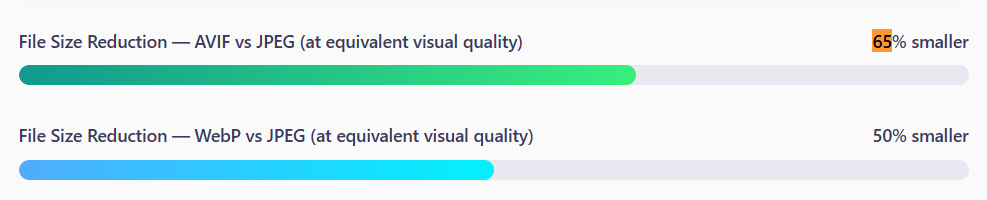
Image Source: Rewarx
Images are usually the heaviest things on a page, and they often slow down LCP more than anything else. If your hero image is a 2MB JPEG, your loading score can suffer no matter how clean your code is.
Modern image formats can cut weight by a huge margin without making visuals look worse. AVIF files can be roughly 65% smaller than JPEGs at the same visual quality, and WebP sits around 50% smaller. That kind of trim can take seconds off your load time.
You can also set width and height on every image tag, lazy-load images that sit below the fold, and add fetchpriority=”high” to your LCP image so the browser knows to grab it first.
Use a CDN to Cut Latency Worldwide
A Content Delivery Network keeps copies of your site’s files at servers spread across the globe. When someone visits your page from Tokyo, your assets load from a Tokyo edge node instead of crossing the ocean from a server in New York.
Picking the right provider matters more than people think. Some focus on raw speed, others on security, and a few on image transformation at the edge. Gcore is a CDN provider that runs a global edge network with built-in image optimization and HTTP/3 support, which can help if your audience sits outside the usual North America and Europe corridor.
When you compare CDN options, you can look at:
- Number of edge locations and how close they sit to your audience
- Support for modern protocols like HTTP/3 and QUIC
- Built-in image and video optimization features
- Pricing model and free-tier limits
- Cache control and purge speed
If most of your visitors come from a single region, even a basic plan can lift LCP by hundreds of milliseconds.
Trim and Defer JavaScript for Better INP
Heavy JavaScript is the main reason pages feel slow after they load. Every script your browser runs blocks the main thread, which directly hurts your INP scores.
Most modern sites carry hundreds of kilobytes of JavaScript, and a big chunk of it does nothing for the visitor. Tracking pixels, A/B test runners, chat widgets, and ad scripts all pile on without much thought.
You can lighten the load with a few targeted moves:
- Split your bundle into smaller chunks so only what’s needed loads first
- Use defer or async on non-critical scripts
- Remove third-party tools you no longer use
- Break long tasks into smaller pieces with requestIdleCallback or setTimeout
- Replace heavy libraries with lighter alternatives when you can
- Lazy-load components that sit below the fold
Even small changes can shift your INP from “needs improvement” to “good.” If you can keep your worst interaction under 200 milliseconds, you’ll meet Google’s 2026 target. Aim for 150 milliseconds if you want a comfortable buffer against future tightening of the threshold.
Stop Layout Shifts From Hurting Your CLS
CLS measures how much your page jumps around as it loads. If a banner pops in late and pushes the article down right when someone goes to click a link, that counts as a layout shift, and Google counts it against you.
The fix is usually mechanical. Set explicit width and height on every image, video, and iframe. Reserve space for ads with fixed-size containers. Avoid injecting new content above existing content unless the user asks for it.
Fonts can also cause layout jumps. When a custom font loads, text reflows, and elements shift around. You can soften that with font-display: swap and size-adjusted fallback fonts that match the real font’s metrics closely.
Aim for a CLS score under 0.1. That number has held steady through every update, so it can be one of the easier wins on the list if you stay disciplined.
Pick Hosting That Can Handle the Load
Source: SearchLab
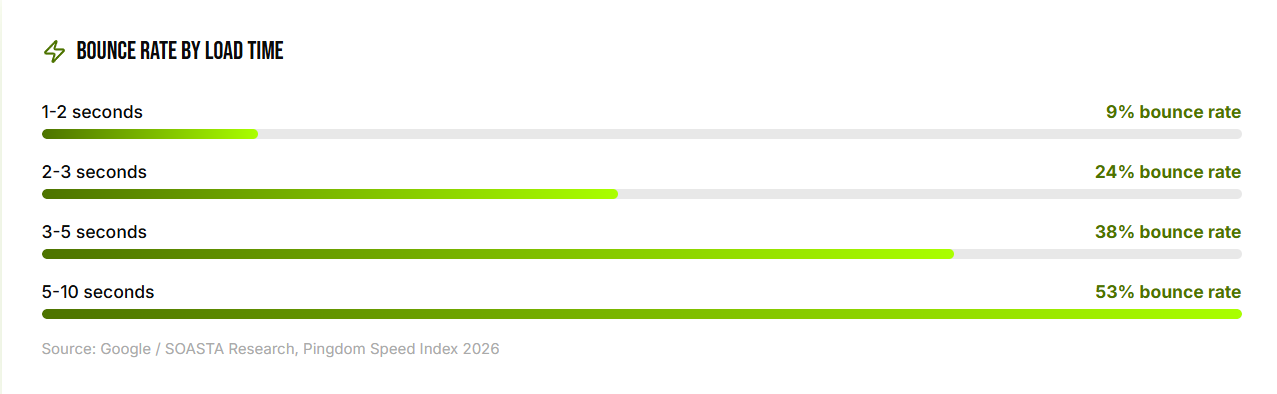
Your server’s response time sets the ceiling for everything else. If your origin takes a full second to respond, no amount of image optimization can save your LCP.
Time to First Byte (TTFB) is the metric to watch. Aim for under 200 milliseconds. Cheap shared hosting can push that number into the 600 to 800 millisecond range, which makes passing LCP almost impossible.
Sites with TTFB under 200ms have 2.1 times more indexed pages than those with TTFB over 1 second, so faster hosting can also help Google find more of your content.
If you can move from shared hosting to managed WordPress, a VPS, or a cloud setup with auto-scaling, you’ll likely see a quick drop in TTFB. Full-page caching with tools like Varnish or Redis can take that even further. For dynamic content, edge rendering keeps things fast without breaking personalization.
Track Real User Data, Not Lab Scores
Lab tests can mislead you. A perfect Lighthouse score on your fast laptop doesn’t mean much if your mobile users on slower networks are still bouncing.
Real User Monitoring (RUM) captures performance from real visitors on real devices. Google Search Console pulls from the Chrome User Experience Report, which uses field data over a rolling 28-day window. If you make a change today, you’ll see the effect in roughly four to six weeks.
A solid monitoring stack can include:
- Google Search Console for site-wide Core Web Vitals trends
- PageSpeed Insights for individual page audits
- A RUM tool like Cloudflare Web Analytics, Datadog RUM, or the open-source web-vitals library
- Lighthouse CI in your build pipeline to catch regressions before deploy
You can also set a performance budget. Pick a JS size limit, an image weight cap, and target metrics. If a new feature breaks the budget, the team can decide if the trade-off is worth it before shipping.
The Shortest Route to Passing All Three Metrics
Core Web Vitals can feel technical, but the work behind them is pretty simple once you break it down. Compress and modernize your images. Plug in a CDN that covers your audience. Trim your JavaScript. Lock down your layout. Pick hosting that can keep up. And measure with real-user data instead of lab scores alone.
If you can get most of these right, you’ll likely move into that top third of sites passing all three metrics, and Google rewards that with steadier rankings.