


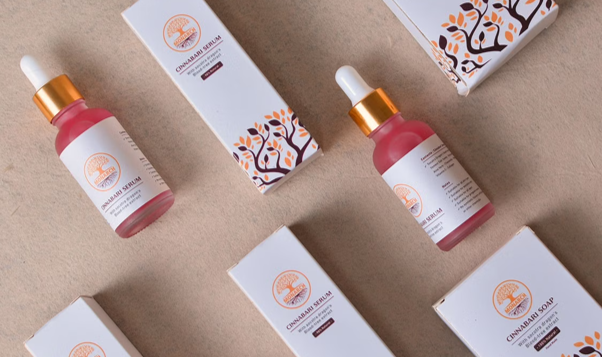
A product photo shoot gives you control over lighting, props, angles, and materials. It also takes time, equipment, and money. AI product images offer a faster way to explore those choices, but can they replace the real thing? We tested realistic product scenes to see where the AI image tool works well, where it still struggles, and when a traditional photo shoot remains the better option.
What We Tested
We used several common product categories: skincare, sneakers, small electronics, and packaged food. The goal was not to create fantasy advertising images. We wanted visuals that could work for an online store, a social media campaign, or an early marketing concept.
The first step was to describe the product, setting, lighting, and camera angle. For example:
A matte black skincare bottle on a pale stone bathroom counter, soft morning light, clean background, realistic commercial product photography.
A clear prompt creates a stronger starting point than simply asking for a “premium product image.” The model needs to understand what the product is made of, where it is placed, and how it should be photographed.
We used the image generator on Pollo AI to create different versions of each scene. The useful part was not getting one final image immediately. It was being able to compare backgrounds, angles, and lighting without setting up a physical shoot for every variation.
Where AI Product Images Work Well
AI performs well when the product has a simple shape and the scene does not require too many complicated interactions.
A bottle on a counter, a pair of sneakers on a studio floor, or a small device on a clean desk can look convincing when the composition is controlled. Product images also benefit from AI when the goal is to explore ideas rather than publish the first result as final advertising material.
For example, a seller may want to see how a product looks in a bathroom, office, bedroom, or outdoor setting before choosing a campaign direction. Creating these variations manually would require props, locations, lighting changes, and new photography. AI can produce early concepts much faster.
It is also useful when a product is still being developed. A brand can test possible packaging colors, campaign moods, and visual styles before the final physical sample is ready.
Materials Make a Difference
Realistic product images depend heavily on how materials behave.
Glass should allow light to pass through or reflect from its surface. Metal needs sharper highlights. Plastic may have a softer reflection. Fabric should show texture rather than looking completely smooth.
A prompt that only says “a premium product on a table” gives the model too little information. A better description explains the material and surface:
A transparent glass bottle with a silver cap standing on a wet stone surface, natural reflections, soft overcast daylight.
This does not guarantee a perfect result, but it gives the image a clearer physical direction.
The background matters too. A shiny product placed on a shiny table can create confusing reflections. A dark product may disappear against a dark background. Good product photography depends on contrast, and AI images need the same kind of thinking.
The Problem With Product Text
The biggest limitation is often text. AI can create a bottle with a label, but the brand name, ingredients, price, or product description may be distorted. A package can look realistic while the small print is unusable.
This makes AI product images more suitable for concept development, social content, and visual testing than for final packaging documentation.
Logos need the same attention. The shape may look close, but small changes can make the brand mark unusable. Always inspect the image at full size before using it commercially.
Hands and Product Interaction
AI product images become more difficult when a person is using the product.
A hand holding a bottle, applying cream, opening packaging, or wearing a shoe adds useful context, but it also introduces more opportunities for errors. Fingers may look unnatural. The product may merge with the hand. If the person is important to the image, describe the action clearly:
A woman applying a small amount of cream to her cheek, holding the open jar in her other hand, natural bathroom light.
If the product needs to remain the main focus, avoid asking the image to show too many actions at once.
Can AI Replace the Whole Photo Shoot?
For early concepts and many digital marketing visuals, it can replace part of the process. It can help teams test ideas, create campaign variations, and produce background scenes without arranging a full shoot every time.
It is less suitable when the image must document the exact product. Physical photography remains important for accurate packaging, precise color, detailed texture, and regulated product claims.
The best approach is often a combination. Use AI to explore the visual direction and create flexible campaign concepts. Use photography when exact physical accuracy matters.
Final Verdict
AI can replace some product photo shoots, but not every product photo shoot.
It works well for concept images, social media content, campaign testing, and products with simple shapes and controlled compositions. It saves time when a brand needs to compare several visual directions quickly.
It still needs human review for text, logos, hands, reflections, and material accuracy. For final commercial images where every product detail must be correct, a real photo shoot remains the safer choice.
AI is most useful when it reduces the cost of exploring ideas before a brand commits to a full production.