


You nail the starter problem, all tests pass, until the interviewer slashes memory and adds a hidden case. Your once-perfect code fails, the clock flies, and that twist is exactly when an ai coding interview assistant earns its keep.
This guide helps you pick the right one. You’ll see the four product categories, a 30-minute “Twist Test” you can run tonight, and the privacy, pricing, and proctoring potholes to check before you pay.
The quick decision rule: score the next turn, not the first answer
An interview isn’t a single swing; it’s a rally. When the panel tightens memory limits or reveals a hidden test, your assistant’s reaction time and memory (not its first code dump) determine whether you stay composed or stall.
Judge every tool on nine moments that matter:
- Captures the full question: spoken, typed, or shared on screen.
- Seconds from question end to a usable hint you can voice.
- Memory that survives a constraint change without hallucinating.
- Edits that touch only the lines that broke.
- Explanations clear enough to repeat under pressure.
- Debug help that pinpoints the failing test and proposes a patch.
- Transparent handling of audio, transcripts, and screenshots.
- Compatibility with your OS, IDE, and meeting app.
- Real cash cost today, including any minute or session caps.
Score each assistant on those nine turns, and the front-runner usually appears within minutes. The next section turns these points into a one-glance matrix you can drop straight into your prep notes.
What an “ai coding interview assistant” really means
The label sounds singular, but it covers four distinct tools. Knowing which kind you’re evaluating keeps price tags and feature lists from blurring together.
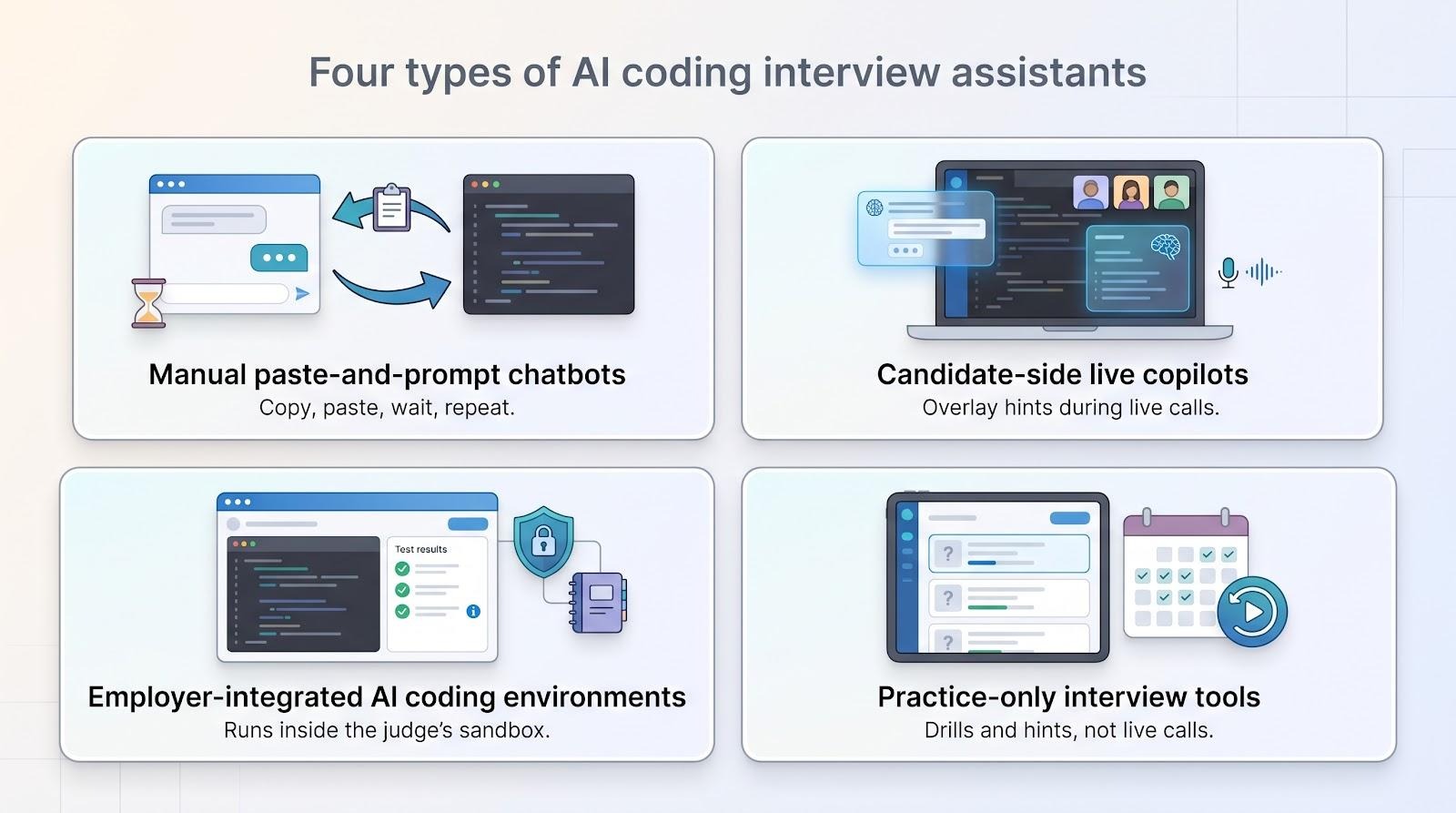
Manual paste-and-prompt chatbots
Think ChatGPT, Claude, or Gemini in a browser tab. You copy the question, paste it, wait for code, then shuttle every follow-up back and forth yourself. Control stays with you; speed does not. In a fast compile-rerun loop, that copy-and-paste tax adds up.
Candidate-side live copilots
Here the assistant lives on your laptop, listens to the call, watches your screen, and whispers an approach or patch before silence turns awkward. Tools such as Interview Copilot (interviewcopilot.ai) surface hints automatically, but that convenience raises new concerns: Can you pause capture, choose the right monitor, and wipe context on demand? The company says the overlay does not appear in screen shares whether you share a window or a full monitor, but this protection doesn’t cover every employer-managed device or proctoring suite, a risk we’ll explore later.
Employer-integrated AI coding environments
Platforms like HackerRank, Codility, and CodeSignal now ship their own assistants. Because they run inside the judge’s sandbox, they see every file and test, then log each prompt and click. In rounds where AI use is encouraged, that visibility is fine, even part of the assessment. In unaided rounds, the same log can flag disallowed help, so always confirm the recruiter’s rules first.
Practice-only interview tools
LeetCode Premium, Interviewing.io mocks, and standalone drill coaches generate questions and hints but never join a live call. They’re perfect for repetition and pause-and-study reviews; they just don’t sit beside you when real stakes and timers appear.
With the four types clear, the next section introduces the “Twist Test,” a quick way to stress any assistant before interview day.
The twist test: a better benchmark for any assistant
Real interviews don’t end at the first “Accepted.” They trim memory, inject hidden cases, and sometimes swap languages. The twist test recreates that pressure so you can see whether an ai coding interview assistant keeps its head.
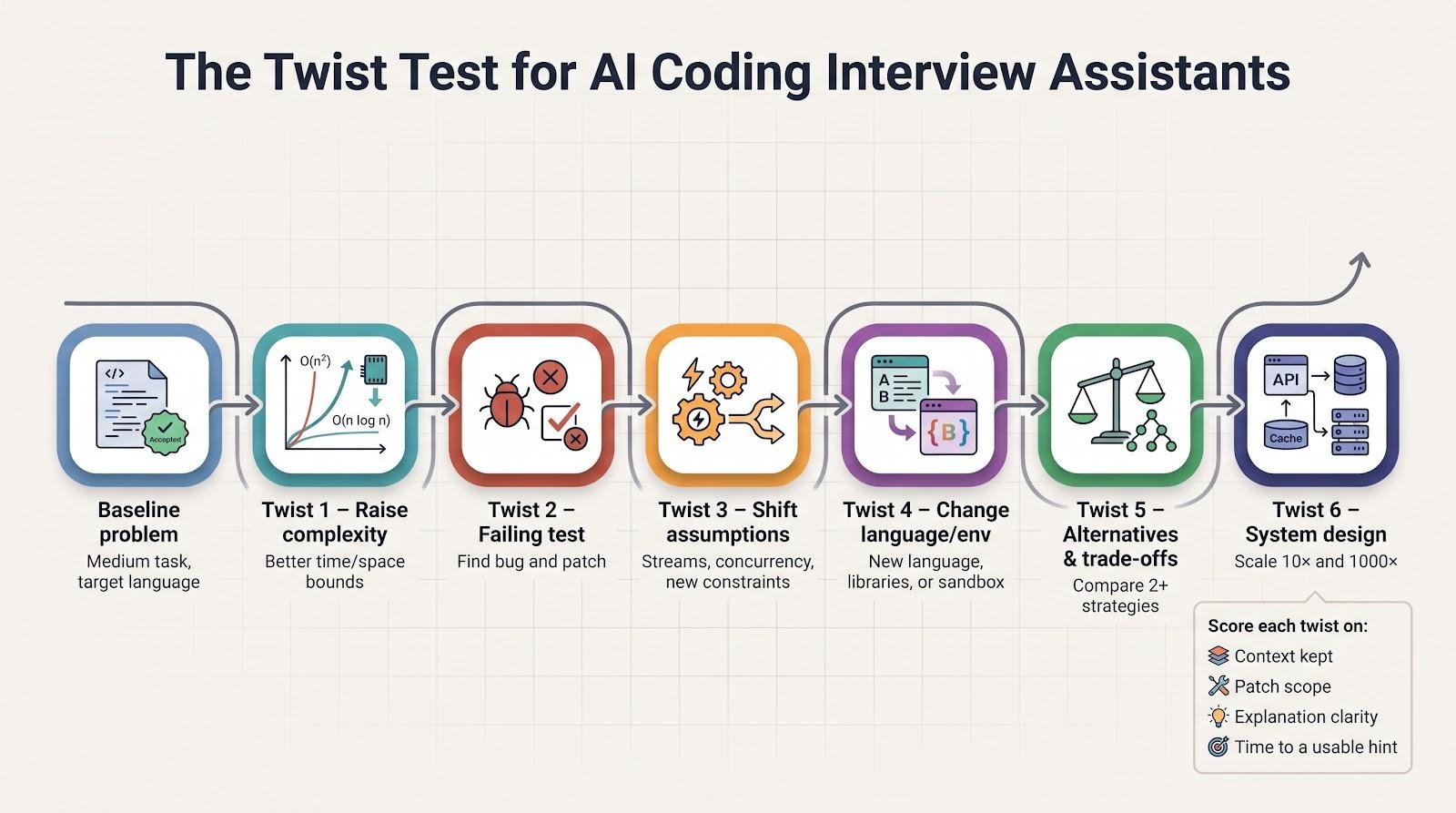
Establish a baseline problem
Pick a medium task (for example, an LRU cache, a sliding-window rate limiter, or a log merger) large enough for deeper optimisations. Give the exact prompt, let the tool respond, and save that snapshot. Every later change should update only what is necessary.
Run the baseline in the language you expect on-site. If your day job is Python but the panel uses Java, test in Java to surface import quirks before they cost you minutes.
Twist 1: raise the complexity bar
Ask for constant space or drop time from O(n²) to O(n log n). A strong assistant will
- restate the new bound so you know it listened
- patch only the hot spots
- justify the new math in plain words
Twist 2: introduce a failing test
Add an off-by-one or concurrency case and read the failure aloud. Look for a pinpointed line number, a minimal patch, and a replay that shows the test now passes.
Twist 3: shift the operating assumptions
Turn the input into an endless stream or make calls concurrent. The assistant should propose batching, windowing, or atomic primitives, then update complexity without bulldozing earlier code.
Twist 4: change the language or environment
Switch to Go or ban third-party libraries. Watch for idiomatic translation, missing imports, and preserved complexity claims.
Twist 5: request alternatives and trade-offs
Ask for two other viable strategies and when each wins. You want crisp pros and cons on complexity, memory, and concurrency, not long filler lists.
Twist 6: zoom out to system design
Scale traffic by 10× and then 1,000×. Top tools sketch components (API gateway, cache, partitioned storage) and connect them to the code you just wrote in language you can repeat in thirty seconds.
Score each turn on context kept, patch scope, explanation clarity, and time to a usable hint. Finish the six twists and you’ll know which copilots deserve a seat in the real interview.
How the assistant receives the problem determines what it can understand
An assistant can only fix what it can “see.” Give it complete context and it feels almost psychic; starve it and it struggles. Six common intake paths shape what it knows and what it might leak.
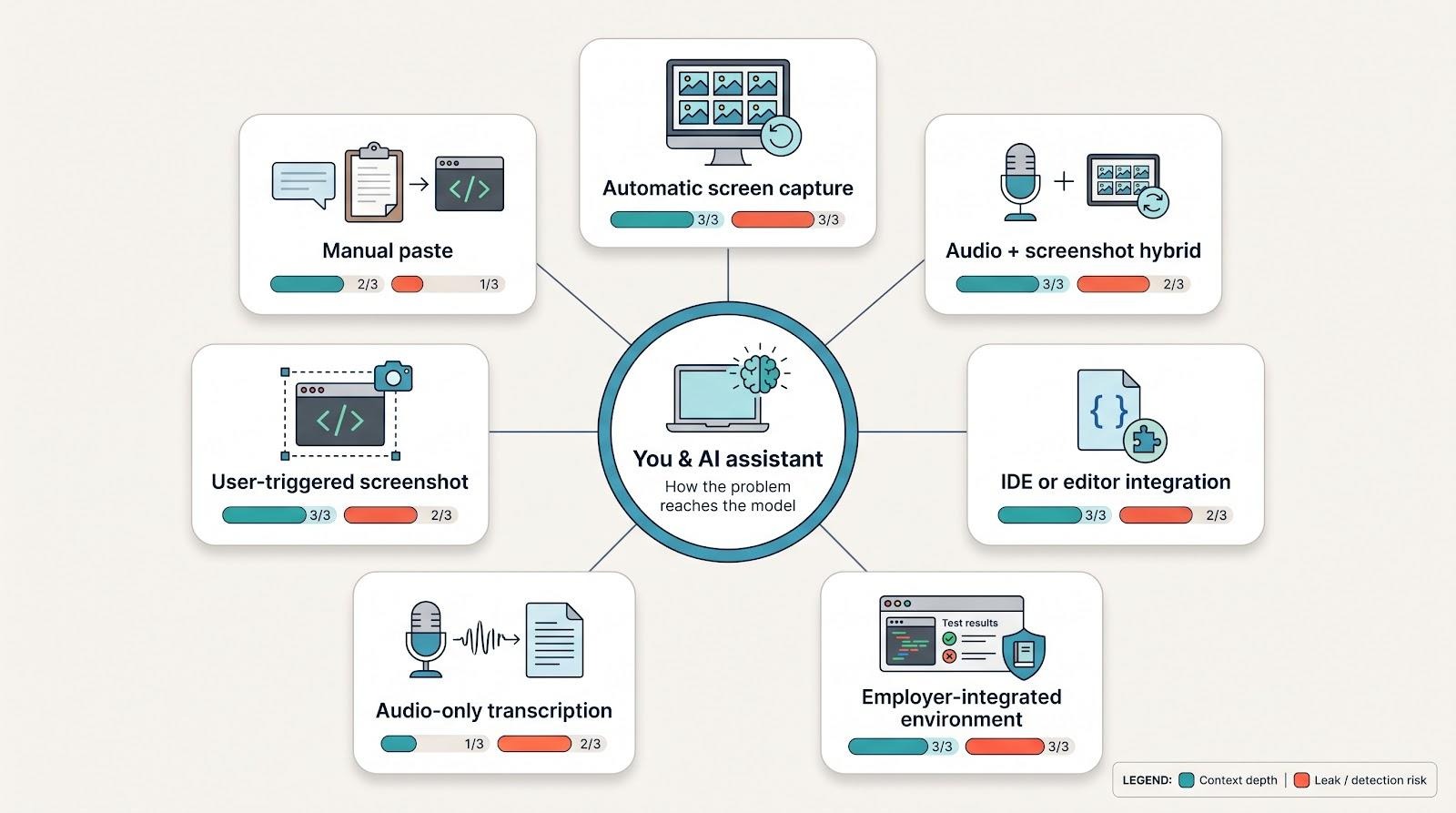
Manual paste
You copy every prompt, test, and error into a chat window. Control and privacy stay with you, but alt-tab latency and missed spoken constraints add up. Paste flows work for solo drills or slow chalk-talks; fast compile-run loops expose the drag.
User-triggered screenshot
Press a hotkey, crop the region, send. Precision is high, yet every scroll or hidden test needs another snap. If a capture overlay cannot fade in and out within a second, silence creeps in.
Automatic screen capture
Some tools grab the active code pane every few seconds. This works when settings are right, but it becomes painful when OCR chews CPU or a key constraint scrolls off-screen. Full-display grabs also risk Slack leaks, and managed devices running employer integrity tools can still spot the overlay.
Audio-only transcription
A mic hook turns questions into text with zero screenshots. Perfect for behavioral or system-design rounds, but blind to line numbers, stack traces, and diagrams. Pair with on-demand screenshots if you plan to tackle algorithms.
Audio plus screenshot hybrid
Real-time transcription combined with a single keystroke for crystal-clear code blocks covers both senses. Timing is everything: capture too early and you send half-written code; too late and the assistant lags behind the conversation.
IDE or editor integration
Plug-ins for VS Code or IntelliJ read the source buffer directly, so there is no OCR and no cropping error. Setup needs permissions, and the plug-in sees nothing in a browser-based judge unless audio or screenshots run in parallel.
Employer-integrated environment
Inside HackerRank, Codility, or CodeSignal, the platform’s own assistant sees your files and tests as plain text and logs every prompt. Use it when AI rounds are approved; skip outside helpers or risk an audit trail you cannot erase.
Match your tool’s capture path to the interview format before you pay a subscription. One mismatch, such as automatic OCR in a locked-down sandbox, can turn a “magic” copilot into dead weight.
Latency means time to a usable next move
Silence drains confidence fast. The timer starts the moment the interviewer finishes speaking and stops only when you reply with a clear next step. Every delay between those points is latency.
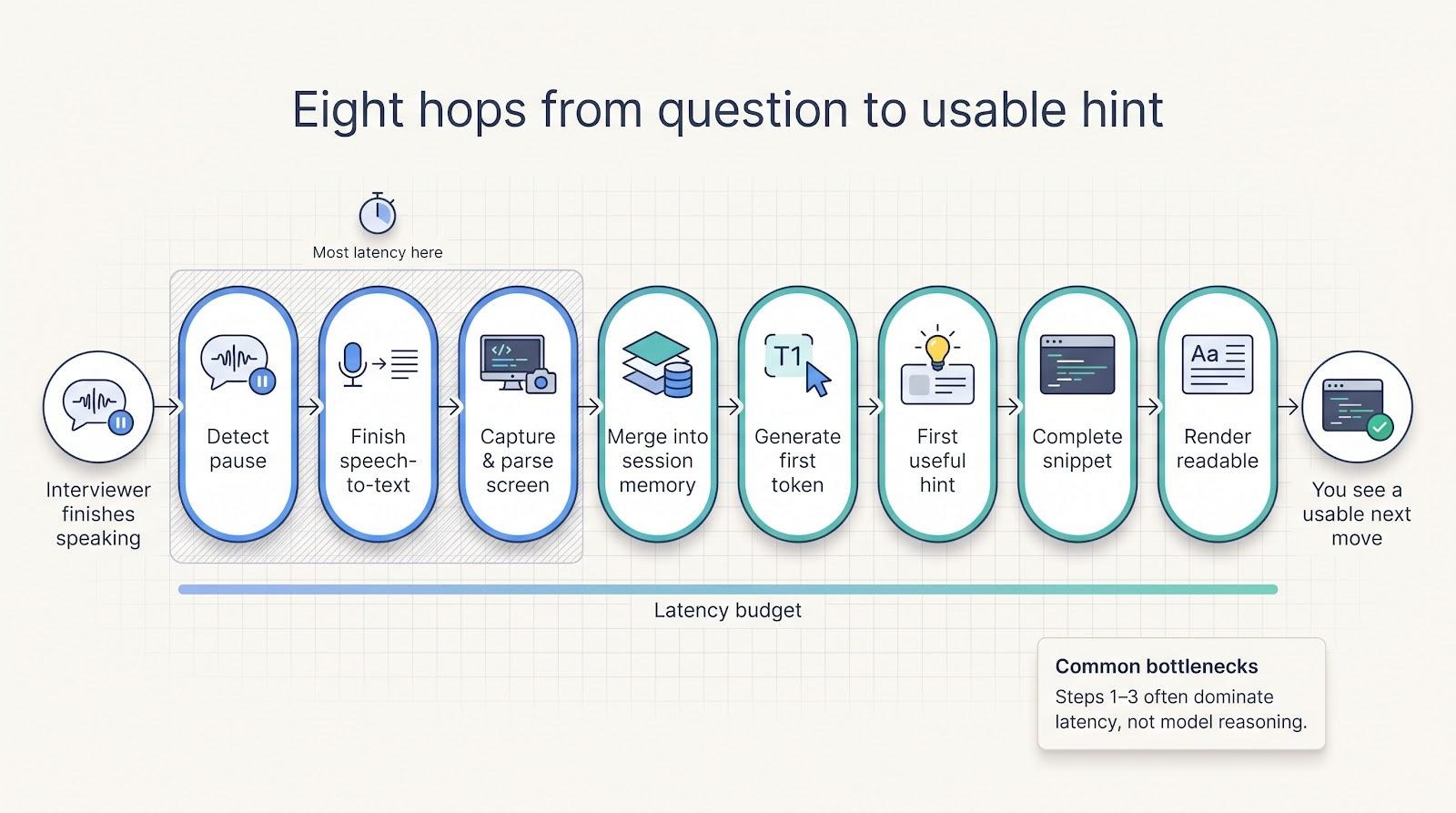
The eight hops that create drag
- Detect the pause that signals the question is over.
- Finish speech-to-text; partial transcripts don’t count.
- Capture and parse the visible code or prompt.
- Merge the new data into session memory.
- Generate the first token.
- Deliver the first useful hint, not just a heading.
- Complete the code or design snippet.
- Render it in a readable font so you can talk while you scan.
Run a mock interview with a stopwatch and identify the slowest steps now, so you will not pay for them under pressure.
Output shape matters as much as model quality
A lightning-fast reply is useless if you can’t read it, explain it, or paste it without breaking imports. How an assistant packages guidance (approach, code, complexity notes, and debug steps) dictates how quickly you turn text into working software.
Approach-first guidance
The best tools open with a two-line roadmap that names the data structure, invariant, and key loop. That cue lets you narrate while you type and prevents “beautiful” code that solves the wrong problem. Good assistants also ask brief follow-up questions (“Are keys unique?”) to surface hidden constraints.
Code generation
Precision beats verbosity. Imports must exist, variable names must match earlier pseudocode, and the language version should match the sandbox. Strong tools stream code in blocks (signature, helpers, main loop) so you can copy before “Answer complete.” Red flags: hallucinated packages, full rewrites, or code that fails python -m py_compile on first run.
Complexity and trade-offs
After code lands, a competent assistant restates time and space: “O(n log n) time, O(n) space,” then explains why the math still holds. One-sentence trade-offs (“We save memory but add two hash lookups”) become talking points when the panel asks “Why this structure?” If Big-O claims never reference the actual loop, mark that as shallow analysis.
Tests, debugging, and verification
Hidden cases separate helpers from hype. When a failure appears, look for three moves: pinpoint the faulty line, propose a minimal patch, and supply a regression test. Continuous-screen tools shine here: they grab the stack trace instantly and return a fix before you finish apologising for the red bar. Avoid assistants that dump an entire file without commentary; bulk replacements breed new bugs you won’t have time to chase.
Representative product comparison: why the columns matter
Reading vendor pages can feel like scrolling ten press releases in a row. Features blur, prices drift, and every tool claims it is invisible on Zoom. A side-by-side matrix fixes that problem. Line each ai coding interview assistant up against the same 11 questions, and the patterns jump out fast.
The 11 columns we track (price verified October 29, 2026):
- Capture method and trigger
- Follow-up memory scope
- Output shape (approach, patch, or full rewrite)
- Debugging and test support
- System-design coverage
- Data path (local, BYOK key, or vendor cloud)
- Is coding included in the cheapest paid plan?
- Hard session limits
- Cash due at checkout (not just monthly equivalent)
- Best-fit user and primary trade-off
- Evidence level (official doc or vendor claim)
Apply that grid and patterns appear quickly. One product hides coding behind a quarterly pre-pay; another nails follow-up memory but shows up in proctoring logs. Below, five real tools, including Interview Copilot, are described from their own vendor pages through this lens.
Interview Copilot
interviewcopilot.ai for coding interviews detects each question you hear on Zoom, Meet, Teams, or Webex and shows answer guidance in a private on-screen overlay. It needs an internet connection, no bot joins the call, and the guidance comes from your résumé and the job description. A shortcut sends a coding task, diagram, document, or job post on screen for analysis, where coding help explains the approach, complexity, and trade-offs. Spoken guidance sits in a lightweight glance panel for short speaking points, and the company says answers start in under a second.
Pricing (vendor-stated, checked October 29 2026). $49 per month or $149 per year. Both plans include all features with no credits or session limits. The app is free to download and test, but a live interview needs a subscription. You can cancel renewal at any time.
Privacy. The company says interview audio is streamed for transcription, not stored; final transcript segments and analysed screenshots are stored with the account. Interview data is not used to train public models, and personal data is not sold.
Fit. Best for candidates who juggle algorithms, system design, and behavioral rounds and want résumé-grounded hints without juggling prompts.
Primary trade-off. The company says the overlay does not appear in screen shares, recordings, or screenshots whether you share a window or a full monitor, and markets it as “Undetectable in any meeting” with no Dock or taskbar icon. However, this protection does not cover every managed device or proctoring system. Verify capture permissions in advance or fall back to a paste-and-prompt flow if the device is locked down.
Final Round AI
Final Round AI positions itself as an all-in-one pipeline for prep, live support, and post-mortem. Its paid plans bundle the live Interview Copilot, Screen Help for on-screen problems, practice interviews, an interview debrief, and a 10,000-question bank, with coding, HireVue, and phone interviews all covered.
Pricing (vendor-stated, checked November 4 2026). Unlimited Interview Copilot costs $25 per month on the yearly plan ($300 at checkout), $83.33 per month billed quarterly, or $150 month to month.
Fit. Candidates who want one timeline from first mock to final debrief and accept higher short-term spend.
Trade-offs. The low rate needs a year upfront. Its refund policy (updated October 8, 2026) offers a 72-hour money-back guarantee once per customer, and only when the billing period shows little use.
Beyz AI
Beyz pairs a real-time interview assistant with a Coding Assistant that, on one shortcut, breaks down the logic, analyzes time and space complexity, and drafts a solution. A practice mode reuses the same context, and the desktop app is built to stay out of screen shares.
Pricing (vendor-stated, checked October 29 2026). The $49.99 month-to-month tier excludes the Coding Assistant; you unlock it only by prepaying quarterly or semi-annually. Three months upfront lands at roughly $100.
Fit. Users who plan several interviews over a few months and want coding help at a lower monthly rate.
Trade-offs. The headline $49.99 plan has no coding help, and coding goes if you drop back to monthly billing. Double-check the plan name and data-flow docs before checkout.
LockedIn AI
LockedIn focuses on configurability. Choose automatic answers that fire the instant a question ends or trigger responses manually with a hotkey. It reads the problem from your shared screen, or you paste it in, which is simple but can pick up more than the problem if other windows are visible. A VS Code extension sends selected code (or the whole file) to the copilot with one shortcut, and can stack snippets from several files into its context before you ask.
Pricing (vendor-stated, checked November 3 2026). The Credits plan is listed at $49.99 a month, billed once every three months (prices shown with the site’s current discount). It includes 400 minutes of live interview help a month.
Fit. Developers who want deep editor integration and granular control over capture behaviour.
Trade-offs. Every plan is billed three months at a time, and screen capture can pick up more than you intend.
MeetAssist
MeetAssist turns your phone into the control panel: pair it by scanning a QR code, then ask it to Solve, Explain, Debug, or Optimize the coding task on screen. In Phone Mode the answers show on your phone, so nothing extra sits on the shared screen, and the desktop app is built to stay hidden from screen sharing and recordings.
Pricing (vendor-stated, checked October 29 2026). After 20 free minutes, one-time passes: $9 for 180 minutes that never expire, $19 for an unlimited week, or $29 for an unlimited month. Nothing renews, and minutes count only while a session runs.
Fit. Ideal when you need short, targeted bursts, such as debugging a stack trace or optimising a loop, without adding another desktop app.
Trade-offs. Latency rides on phone hardware and Wi-Fi, which can introduce delays before the first hint. Juggling taps while coding can also feel clumsy in rapid-fire rounds.
Pricing: calculate the cost of the coding feature you actually need
Sticker prices hide plenty. One tool lists $49 a month, another advertises $25, and a third waves a one-time pass. Those numbers shift once you factor in prepay terms, plan-gated coding access, and session caps.
Start with cash due today. If Final Round AI charges $300 at checkout for an annual plan and Beyz asks for a three-month ~$100 prepay, the lump sum matters when you balance rent. Divide that figure by the live interviews you expect this quarter. $40 ÷ 8 sessions = $5 each. The same forty bucks for one panic purchase is far less attractive.
Next, confirm the plan includes coding. Vendors often hide the assistant behind “Pro,” “Plus,” or “Live” tiers. If you don’t see wording such as “Coding Copilot” or “Screen Help,” assume it is not included.
Finally, normalise limits. Some plans meter minutes, others meter screenshots or model messages, and a few stop at 60 minutes per session. Compare that ceiling to your longest panel. A 90-minute system-design round will overrun a one-hour cap.
Use this quick check:
(cash due now ÷ expected interviews) × (longest interview ÷ session limit)
Anything above $20 per usable interview should buy flawless follow-up memory; otherwise, keep shopping. Record every price with “checked October 29, 2026” in your spreadsheet, because vendors change numbers more often than they ship features.
Privacy and security: map where each byte goes
A polished UX means nothing if your résumé lands in a training corpus or a proctoring bot flags hidden windows. Before you pay, trace every artifact (audio, transcripts, screenshots, code, and docs) and ask three questions.
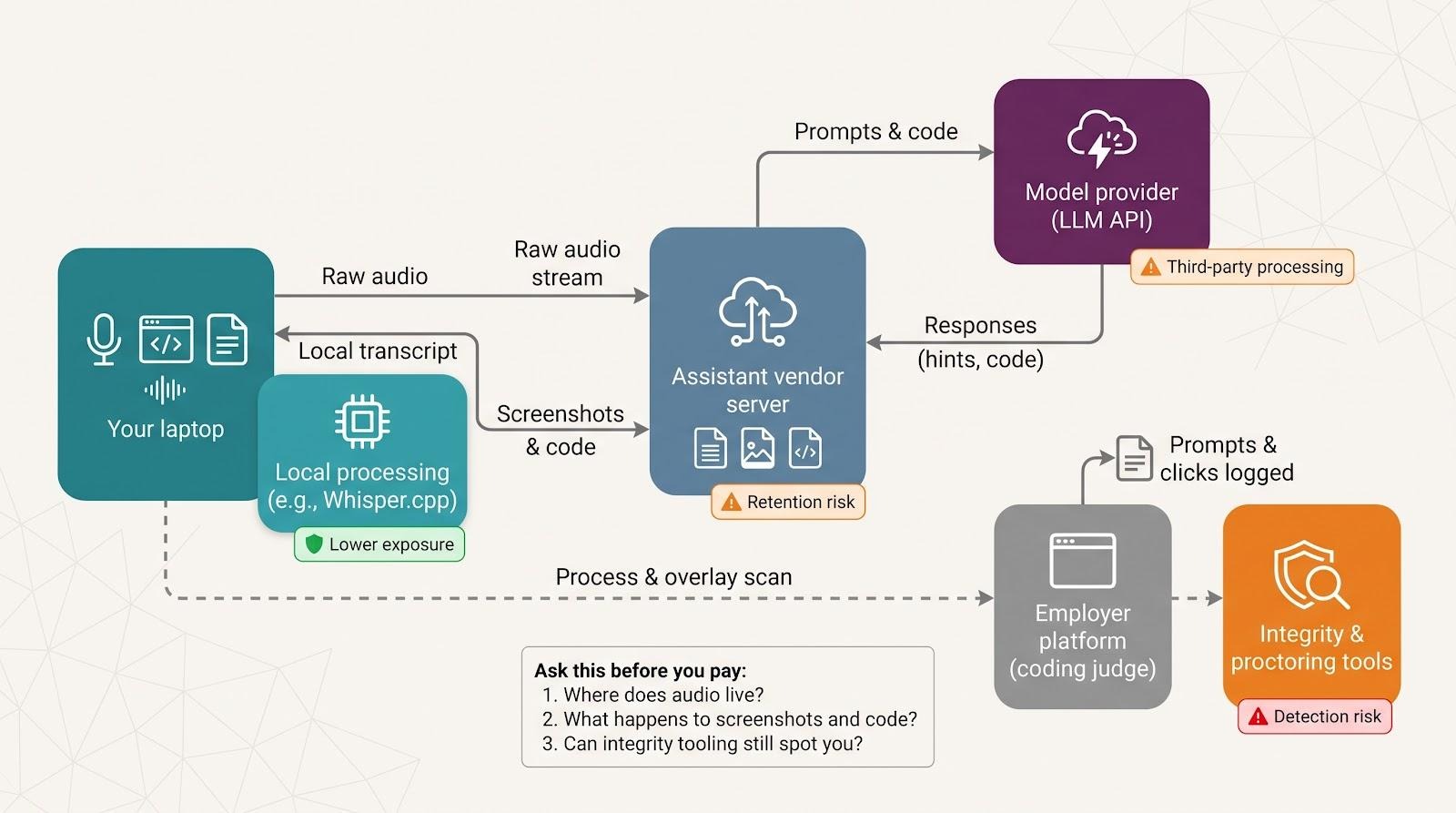
- Where does audio live? Local Whisper.cpp keeps raw sound in RAM, while cloud speech sends it to a vendor server. If a site claims “local,” confirm that it doesn’t stream finished text for analysis.
- What happens to screenshots and code? Continuous capture often OCRs in the cloud, and one-shot tools may forward images straight to OpenAI or Anthropic. Demand specifics: instant discard, 30-day retention, or “quality-improvement” storage?
- Can integrity tooling still spot you? Employer integrity tools can scan running processes even when overlays stay off-screen. “Invisible on Zoom” does not equal undetectable on a managed machine.
The safest path is consent: ask the recruiter whether personal AI is allowed, use the platform’s own agent when it is offered, and treat every mock as public. If a vendor cannot answer “Where is my data stored, and for how long?” consider another option.
Screen-share privacy is not the same as being undetectable
“Invisible overlay” claims often hold when you share a window or an entire monitor on a personal laptop. Employer tools can still add browser extensions, inspect the clipboard, or run operating-system scans. Managed devices may block screen-recording permissions completely. Stay clear: if outside AI is banned, skip it. If the round allows AI, be ready to explain every generated change.
Platform compatibility and reliability under interview pressure
An assistant that checks every feature box can still fail you if it drains battery or crashes mid-panel.
- Operating system. Confirm minimum macOS or Windows versions and Apple Silicon versus Intel support. Test again after OS updates.
- Meeting platform. A Zoom-only overlay might miss Google Meet. Share a window and a full display to verify invisibility claims.
- Resource usage. Continuous OCR can load the CPU, spin up fans, and stutter video. Watch Activity Monitor or Task Manager during practice.
- Recovery. Kill Wi-Fi for 10 seconds or revoke the mic permission, then reconnect. Good tools restore context; weak ones forget it. Keep a text copy of the prompt every 15 minutes as insurance.
A weighted decision framework for different interview loops
One score won’t fit every loop. A back-end engineer facing five algorithm rounds values follow-up memory and patch accuracy, while a staff architect tested on scale shifts weight to system-design depth. Start with a 100-point template, then adjust each slider to match your panel.
| Criterion | Default weight |
| Follow-up and state retention | 25 |
| Time to useful output | 20 |
| Capture reliability | 15 |
| Code + explanation accuracy | 15 |
| Privacy and security | 10 |
| Pricing and limits | 10 |
| Platform fit and usability | 5 |
Example recalibration: If your round is 70 percent dynamic programming and 30 percent design, add +5 to capture reliability and +5 to code accuracy, borrowing those points from privacy and pricing.
Working under a security-cleared government contract? Push privacy to 25 and require local transcription with BYOK keys. In an AI-approved system-design round, shift 10 points from code accuracy to long-session memory and trade-off reasoning.
How to run a 30-minute bake-off before paying
Real practice beats marketing copy. Block half an hour, stage a sanctioned mock call, and pit your top two ai coding interview assistants against each other.
- Match the real setup. Use the same laptop, IDE, mic, and network you’ll have on interview day.
- Clock setup friction (about 2 min). Load an LRU cache or rate limiter and note how long permissions and overlays take.
- Measure first-pass speed (about 5 min each). Time question end to the first usable hint.
- Apply three twists (about 12 min). Tighten complexity, inject a failing edge case, then add a scale-up prompt. Record context retention and patch scope.
- Verify screen-share privacy (about 3 min). Share your screen from a second device to see what the interviewer would see.
- Test resilience (about 3 min). Kill Wi-Fi for 10 seconds, reconnect, and note whether session memory survives.
- Check deletion controls (about 2 min). Wipe transcripts and screenshots where the vendor says you can, and confirm they vanish.
Score latency, follow-up coherence, and cognitive load, then plug the numbers into your weighted rubric. In thirty minutes you’ll know which assistant earns a subscription and which one stays off your machine.
Frequently asked questions
What is an ai coding interview assistant?
Software that listens to a live question, captures your screen or editor, and suggests approaches, code, and patches in real time. Some live inside platforms like HackerRank, while others run as desktop overlays or mobile helpers.
Is using one allowed in a technical interview?
Only if the employer permits it. Some companies now allow AI in specific rounds and ban personal tools in others, so ask your recruiter and follow the written rules.
Can an assistant handle follow-up questions?
Tools with session memory usually can. Paste-and-prompt chatbots forget unless you restate every change. Verify this during your 30-minute bake-off.
Will it work with CoderPad, HackerRank, or CodeSignal?
Screen-capture overlays can read any browser IDE. Embedded platform agents have deeper access. Local editor plug-ins see nothing inside a remote judge.
Is the overlay invisible to the interviewer?
Vendors say it does not appear in screen shares, whether you share a window or a full monitor. Managed devices or proctoring tools can still detect hidden helpers. Invisible does not mean undetectable.
Does local transcription mean full privacy?
Local audio stays on your machine, but screenshots and prompts may still reach a cloud model. Trace every data flow before trusting privacy claims.
Are ChatGPT or Claude enough?
For paced practice, yes. In a live call the manual copy-paste costs seconds and can miss spoken constraints. A live copilot saves mental cycles when latency matters.
What should I test before subscribing?
Run the 30-minute bake-off: latency, follow-up memory, pricing math, screen-share visibility, and deletion controls. If any step fails, keep shopping.
Conclusion
The goal isn’t a one-size-fits-all “best” assistant. It’s the right assistant for this interview, on this laptop, at this company. A weighted rubric gives you a clear answer when teammates ask, “Why that tool?”