
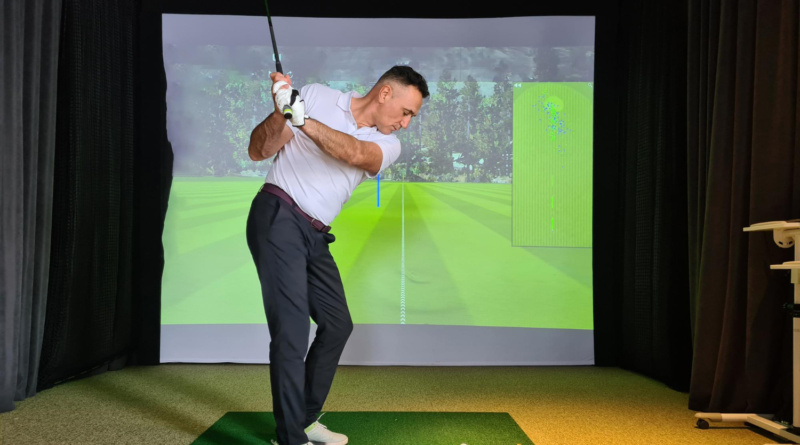
How to Choose the Best Golf Simulator Setup for Your Home Space
A home golf simulator can support steady skill work, low-impact movement, and relaxed social time without leaving the house. Strong results usually begin with room planning, because ceiling height, ball tracking, screen shape, and software all affect comfort. Early comparison helps buyers avoid layout errors that can disrupt swing mechanics or strain the body. The right setup should accommodate natural motion, deliver reliable feedback, and remain practical for regular use.
Start With Room Fit
Room dimensions deserve attention before you place any order. Players need space for a full backswing, balanced follow-through, and safe recovery after contact. Many buyers review the aboutGOLF home golf simulator when comparing width, depth, and ceiling clearance, as these measurements influence posture, club path, and confidence. A cramped area can force compensation patterns that weaken the quality of contact.
Choose Data That Measures, Not Guesses
Accurate feedback matters more than flashy graphics. Useful systems record ball speed, launch angle, spin axis, carry distance, and club delivery with repeatable precision. That level of detail helps golfers connect movement patterns with ball flight. Faulty readings can send practice in the wrong direction and reinforce poor habits. Reliable numbers support better decision-making, whether the goal is sharper wedge control or longer drives.
Why Camera Tracking Often Suits Indoor Use
Indoor settings can affect how sensors read the strike. High-speed camera systems often suit enclosed spaces because they capture impacts directly and respond well under controlled lighting conditions. Radar can still perform well, though nearby walls may influence certain readings. Infrared units may be lower-cost, yet some players notice reduced detail. The choice of technology should reflect room conditions, practice goals, and expected accuracy.
Match Screen Type to the Room
Screen design changes how the room feels and functions. Curved surfaces can create broader visual depth, which helps many players judge ball flight more naturally. Flat options often suit shared spaces that also host films, console games, or televised sports. Households should weigh immersion against flexibility. A room used every week for several activities usually benefits from a display plan that offers greater utility.
Plan for Safe Swing Clearance
A simulator should allow unrestricted movement from the address to the finish. Limited ceiling height can prompt shoulder guarding, shortened extension, or altered spine angle during the downswing. Side clearance also matters, especially in homes with both right-handed and left-handed players. Standing too near the screen may increase hesitation at impact. A simple practice swing in the empty room can reveal problems before installation begins.
Software Should Keep Practice Fresh
Software often determines whether a simulator becomes routine or gathers dust. Strong platforms offer course play, target practice, skills tests, and short games that keep attention engaged. Variety supports motor learning because players face changing lies, distances, and visual demands. Some systems include large course libraries with many competitive formats. Regular updates matter as well, since stale content can reduce motivation over time.
Think Beyond Golf Alone
Many households expect the space to serve more than one purpose. A simulator can also function as a media room, family activity area, or guided exercise station during colder months. That broader use often improves value across the year. Shared access may also raise consistency, because equipment that stays visible and welcoming tends to encourage frequent movement rather than occasional novelty use.
Compare Custom and Fixed Packages
Package style should match the room, budget, and finish expectations. Custom builds often suit unusual architecture, lower beams, or homeowners who want cabinetry and lighting integrated neatly. Fixed packages can simplify decisions and provide clearer price ranges. Each path has merit. A standard enclosure may fit a straightforward basement, while a custom plan can make an awkward footprint feel intentional and comfortable.
Installation and Support Matter Later
Purchase decisions should include setup guidance and ongoing service. Proper calibration affects launch accuracy, spin readings, and overall realism from the first session. Technical support also becomes important if the software stalls or a sensor needs adjustment. Providers who handle planning, installation, and follow-up care can reduce confusion later. Consistent support helps preserve performance, protect the investment, and limit avoidable downtime after setup.
Use Budget as a Decision Filter
Budget works best as a clinical filter, rather than an emotional trigger. Golfers focused on skill development may value measurement quality above dramatic visuals. Families may place greater weight on entertainment options and multi-use flexibility. Ranking priorities before comparing packages usually leads to wiser spending. That process keeps funds aligned with actual use and reduces the risk of paying for features that go untouched.
Conclusion
Choosing the best home golf simulator setup depends on careful planning, realistic goals, and respect for physical comfort. Room size, tracking accuracy, screen format, software range, and support quality all shape the long-term experience. Buyers who weigh those factors early usually avoid expensive corrections later. A strong system should allow natural movement, provide trustworthy feedback, and remain useful for practice, recreation, and shared indoor activity year-round.