
How Live Chat Software and AI Agents Cut Customer Support Response and Wait Times
You click “Chat now,” type a question, and then…nothing. That pause can feel as long as a phone queue. Yet the latest numbers show that waits can shrink fast when live chat and AI are set up well. Comm100’s 2026 benchmark, built on more than 220 million live chat interactions across 18 industries, found that AI Agents handled 75.3 percent of chats and that large support teams cut wait times by 37.5 percent, while customer satisfaction held steady at 4.1 out of 5. Small teams, by contrast, saw waits rise. The difference is not the software alone. It is how intake, routing, knowledge, staffing, and hand-offs are designed, and how clearly each message tells the customer what is happening.
Before you chase speed, know which clock is running
“Response time” is really five separate timers:
Queue wait time: the seconds from the customer’s request until a bot or a person accepts the chat.
First response time: how long it takes to send any reply, automated or human.
Average in-chat response time: the pause between each customer message and the next reply. Multitasking stretches this gap.
Resolution time: the minutes or hours until the issue is truly closed. First-contact resolution asks whether that happened in a single session.
First useful response: the first message that moves the problem forward. It is the only timer the customer really notices.
Track each timer on its own. A two-second bot greeting can hide a ten-minute human hand-off, and a brisk first reply can still lead to three repeat contacts.
Comm100’s 2026 study on live chat for improved customer support wait times analyzes more than 220 million interactions across 18 industries and shows that large AI-enabled teams cut queue waits by 37.5 percent while keeping satisfaction at 4.1 out of 5.
Because the report slices wait time, response time, and CSAT by both industry and team size, it is a sharper yardstick than generic averages when you set targets for each clock.
Why chats stall: the five bottlenecks behind long waits
Demand arrives in bursts, not smooth averages
Customer traffic surges and then falls, often within the same hour. Late mornings, Mondays, product launches, and outages all pile requests into narrow windows. If staffing, routing, or schedules are built on daily averages, queue waits climb during the peaks, customers give up, and agents scramble to catch up.
Stay ready by:
- Monitoring real-time arrival patterns, not yesterday’s averages
- Stress-testing forecasts against worst-case spikes
- Writing a surge playbook: who joins, which queues flex, and which tickets can wait until load falls
Planning for the spike, not the mean, keeps the timers steady when a promotion goes viral or an outage hits at lunch.
Requests enter the wrong queue
One catch-all “Account help” button can funnel payments, password resets, and shipping complaints into the same inbox. Each misrouted chat forces an agent to triage and then transfer, and every transfer restarts discovery. That is why many teams track chat transfer rate as a KPI in its own right.
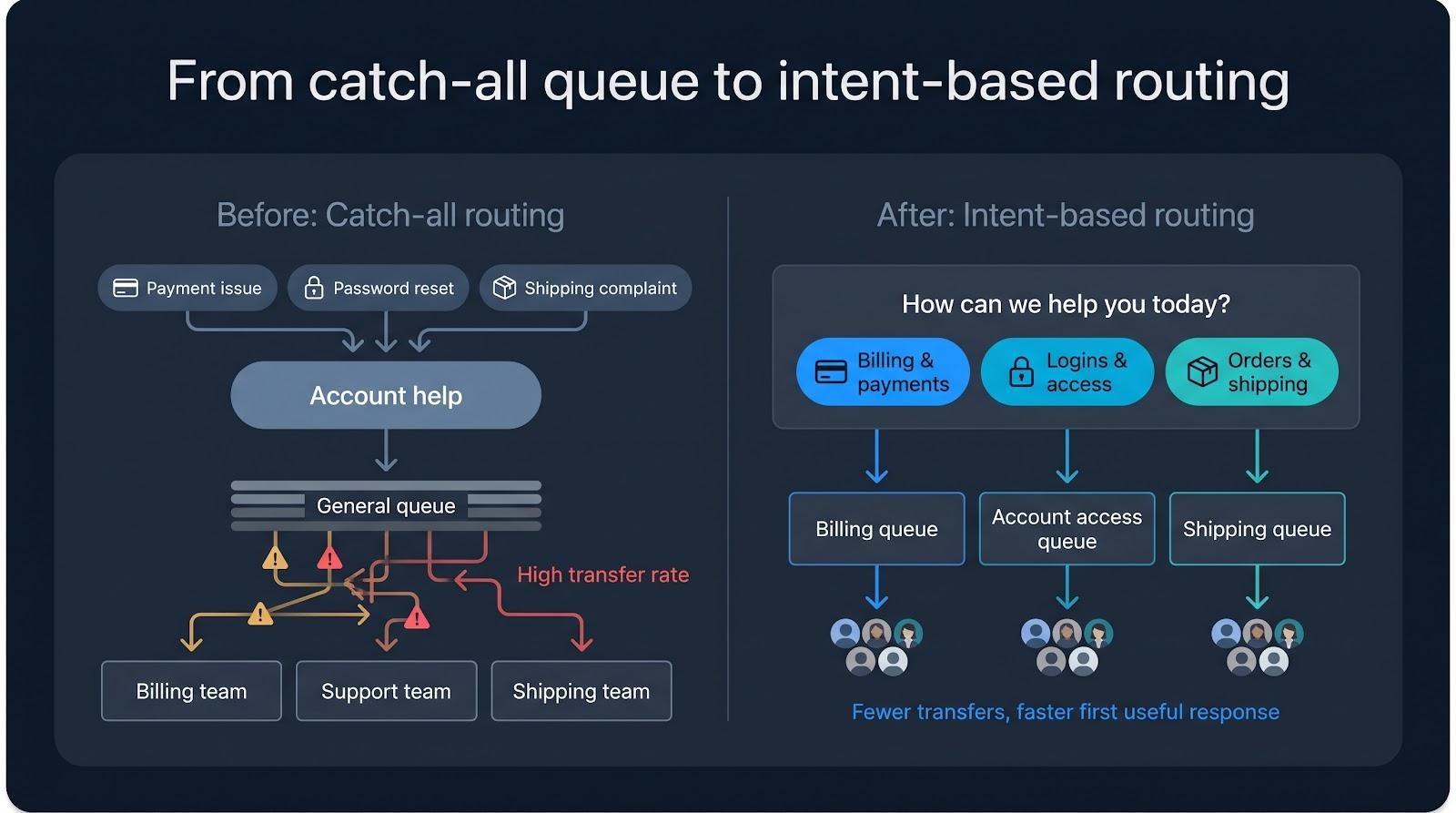
Reduce the detour by:
- Capturing intent up front with a short pre-chat form or one clarifying question
- Using tags or skill-based routing to send niche issues to the right specialists
- Reviewing transfer reports weekly to spot buttons or labels that customers misread
The wording of those buttons matters as much as the routing logic behind them. “Billing and payments” and “Orders and shipping” tell customers exactly where to click. “Account help” does not.
Agents search across disconnected tools
Agents who bounce among a CRM tab, order history, a shipping portal, and a policy wiki pay an invisible tax: context switching. Every jump adds silence on the customer’s side and raises the odds of a copy-paste error or a “let me double-check.”
Two fixes shorten the gap:
- Unified workspace. Pull customer details, order data, and knowledge snippets into one screen so research happens beside the conversation.
- Proactive suggestions. Show the most relevant article or saved reply based on the customer’s last message, so the agent does not have to search.
For example, Comm100 brings live chat, email, SMS, social, and messaging apps into a single agent console and connects to CRMs such as Salesforce and HubSpot, so agents can reply without hopping between tabs.
Customers repeat the same story twice, sometimes three times
When context fails to follow the customer, effort multiplies. A shopper might describe a return to the chatbot, repeat it for a live agent, then recap it again when accounting asks for the order number. Each retelling restarts the mental clock and signals that the company is not listening.
Break the loop by:
- Passing the full transcript and collected fields with every transfer or channel change
- Showing a one-sentence summary (“return for order #5843: wrong size”) at the top of each agent’s screen
- Measuring a “repeat information rate” in post-chat surveys or quality reviews to catch regressions early
The knowledge or authority to solve the problem is missing
Sometimes speed stalls because no one in the chat is allowed, or informed enough, to press the needed button. Outdated articles, missing documentation, and narrow system permissions force agents to escalate cases they could have closed.
Close the gap by:
- Keeping a single, version-controlled knowledge base that shows each article’s owner and last review date
- Mapping each common action (refund, plan change, address fix) to the minimum permission it needs
- Auditing escalations weekly: was the trigger missing access, outdated guidance, or true complexity?
When the person or bot who greets the customer can also finish the job, minutes of internal pings and manager approvals disappear from the queue.
Live chat mechanics that cut waits before AI writes a word
One agent can manage more than one conversation
Phone support is one to one, but live chat can be one to many. Most teams find that two or three simple chats at once is a comfortable range before quality slips. Even two concurrent chats doubles capacity without doubling headcount. The caveat: complex cases such as billing disputes or warranty claims need an agent’s full attention, so lower the cap whenever a chat is tagged high effort, and track in-chat response time by complexity tier.
Routing happens the moment the widget opens
Email tickets sit in a back-office queue, but chat can triage up front. One clarifying question (“tracking, subscription, or troubleshooting?”) plus page context, language, and agent workload lets routing rules send a VIP to retention and a password reset to a quick-solve queue. When the first minute is spent routing correctly, every timer that follows gets shorter.
The agent sees context before replying
Live chat can pass the customer’s name, order history, and current page into the workspace. The first line shifts from “Can I have your email?” to “I see you’re tracking order #5843; it shipped this morning.” Fewer tab hops mean a faster first useful response.
Saved replies trim the typing
Templates for greetings, disclaimers, and common steps cut typing time. Automate the fixed pieces, then add one tailored sentence so the message feels personal rather than robotic.
Queue visibility manages expectations
A spinning widget leaves customers guessing. A position cue calms them. Posting “You’re 3rd in line, about two minutes” replaces uncertainty with a choice, and fewer people abandon a queue they can see moving.
Embedded self-service prevents some contacts
Gartner found that only 14 percent of customer service issues are fully resolved in self-service, far below the deflection rates many dashboards claim, yet still a meaningful volume saver. Surface the right article or step-by-step guide inside the chat window, and give users an easy path to a human when the answer is not clear.
How AI agents and copilots remove the next layer of delay
AI eases different bottlenecks depending on its role.
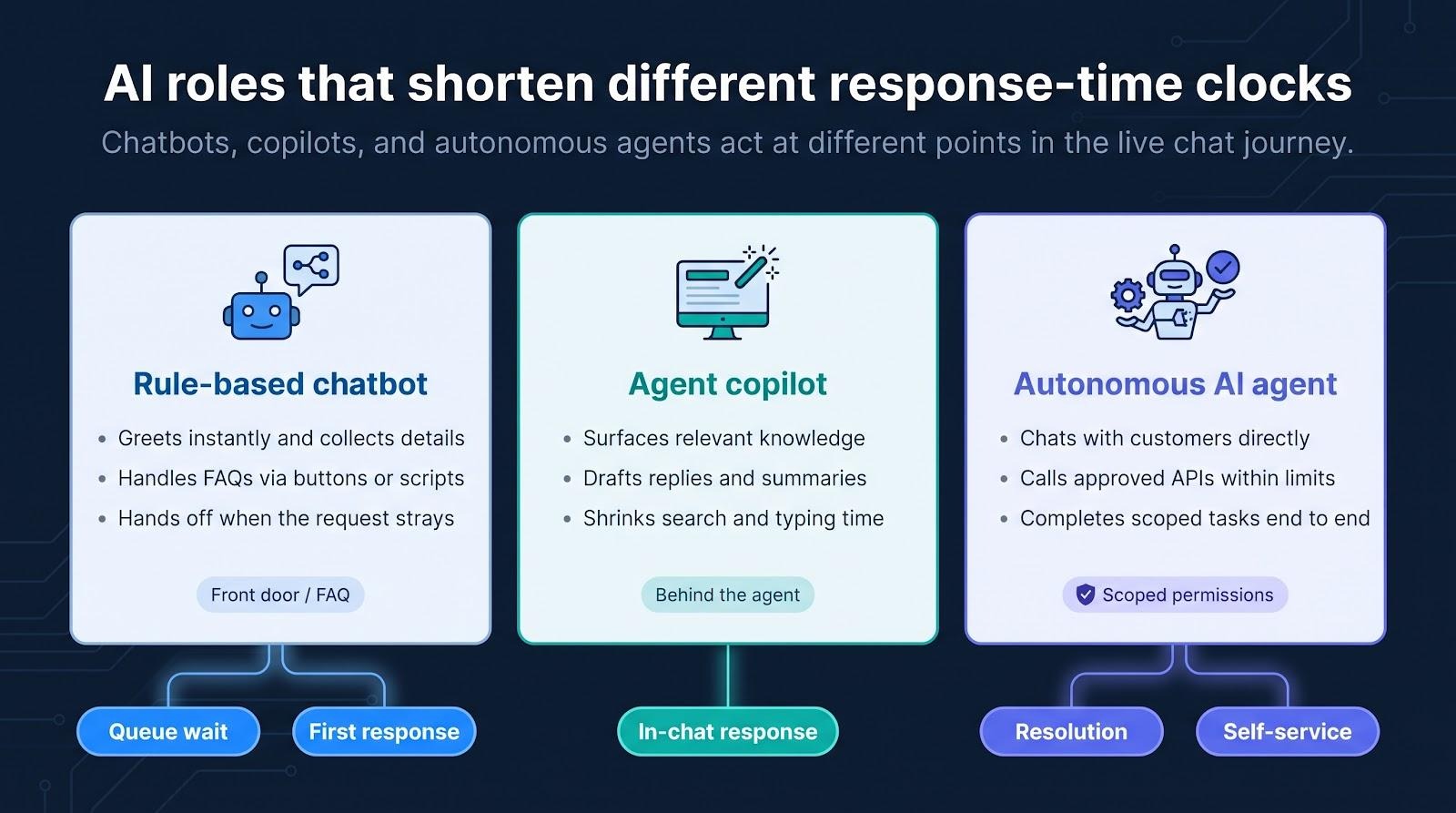
1. Chatbots greet and gather
A bot can say hello instantly and collect order numbers, error codes, or language preference while the human queue catches up. It can also ask a quick follow-up when the request is unclear, or offer a self-service link when the fix is one click away. The human then joins a conversation that is already scoped. In Comm100’s benchmark, the AI share of chat handling reached 75.3 percent, and chatbot satisfaction rose 9.1 percent.
2. Agent copilots cut search and typing
Copilots read the customer’s last line, fetch the right article, and draft a reply for the agent to edit. In a field study of more than 5,000 customer support agents, published in the Quarterly Journal of Economics in 2025, an AI assistant raised issues resolved per hour by 15 percent on average, with the largest gains for less experienced staff. The human shifts from writing to editing and keeps energy for empathy and judgment.
3. AI classifies and routes in real time
While the customer is still typing, a model can tag intent, urgency, and sentiment, then push a fraud claim to a senior queue or a password reset to automation. Serious issues jump ahead of easy ones without a supervisor paging agents, and specialists stay free of simple distractions.
4. Grounded agents retrieve knowledge, then act
A grounded AI agent answers from your approved knowledge base, rephrases the answer in plain language, and, where policy allows, triggers the action itself: a reship, a date change, or a small refund. This is where resolution time drops most, because the system fixes the issue instead of only explaining it.
5. Warm hand-offs preserve context
When confidence drops, the bot summarizes the transcript, the tools it used, and the suggested next step, so the human starts informed instead of asking the customer to repeat. Comm100’s 2026 benchmark puts satisfaction with chatbot-to-agent hand-offs at 92.6 percent.
Guardrails that keep speed from backfiring
- Expose only pre-approved actions and cap refund amounts.
- Escalate on low confidence, regulated topics, or repeated clarifying loops.
- Log every AI action for audit, and replay samples weekly to catch drift.
With these controls in place, AI removes the seconds hidden inside greetings, routing, research, and repetitive typing without turning a fast chat into a longer problem later.
What recent evidence says about the gains
Platform benchmark evidence
Beyond the headline wait-time and satisfaction figures, Comm100’s 2026 benchmark found that agent workloads dropped 5.8 percent while chat duration stayed flat, which suggests the chats left for humans are getting harder, not shorter.
Human-assistance evidence
The Quarterly Journal of Economics study above found the 15 percent productivity gain came mostly from newer agents, who learned faster with AI suggestions. The assistant trimmed micro-delays such as searching policies and rephrasing answers.
Where adoption is heading
Gartner predicts that by 2029, agentic AI will autonomously resolve 80 percent of common customer service issues. Most organizations are still early on that path, so the practical gains today come from pairing AI with better routing, knowledge, and hand-offs.
The speed-quality trap: when a faster answer creates a longer problem
An instant greeting is not an instant solution
A two-second “Hi there!” scores well on first response time but solves nothing. If the bot follows with a circular menu, the customer’s clock keeps ticking. Real progress starts when the first message clarifies intent, supplies a relevant answer, or routes correctly.
Handling, containment, and resolution are not synonyms
A tracking link may mark the chat “handled,” but if the parcel still shows “label created,” the issue is not resolved.
- Handled: the bot took part.
- Contained: no human was needed.
- Resolved: the problem is gone and does not come back.
Track each stage to see where speed gains are real and where work is merely deferred.
AI can leave a harder human queue
As AI absorbs routine volume, the work left for people skews toward fraud, multi-part bugs, and emotional complaints. Staff that residual queue like a specialist clinic, with lower concurrency caps and deeper tools.
Late escalation is costly
A customer who has fought a bot for five minutes arrives at the human agent frustrated. Trigger the hand-off early: on low confidence, repeated clarifying questions, or rising negative sentiment, not after the customer starts typing in capitals.
Customers need control
Many customers still want a clear route to a person when AI is involved. A visible “Talk to a person” button, a short note on what the bot can do, and a transcript that travels with the hand-off turn automation into optional speed instead of a maze.
Implementation playbook: reduce waits without adding bot friction
Phase 1: Establish the baseline
Pick one high-volume journey (order-status chats during peak season, for example) and record every clock: queue wait, first reply, first useful reply, and resolution. Capture the median and the 90th percentile. Pull 20 random transcripts and tag each delay (lookup, approval, customer silence). Finish by writing a one-page metric dictionary so every team uses the same terms.
Phase 2: Select a narrow first use case
Automate what is high volume, low risk, well documented, binary in outcome, easy to escalate, and backed by a single source of truth. Order tracking or address changes qualify; complex financial hardship cases do not. List the edge cases you will not handle. Roll out to 5 to 10 percent of traffic and compare against your Phase 1 numbers before expanding.
Phase 3: Repair knowledge and data access
Audit every article and saved reply. Delete duplicates, fix contradictions, and stamp each piece with an owner and review date. Open key systems (order status, approved refunds) with least-privilege access and audit logs. Capture every AI “no answer” and every rejected suggestion, and turn those gaps into new articles each week.
Phase 4: Design routing and escalation
Define hard triggers for a human takeover: low confidence, repeated clarifying questions, negative sentiment, regulated topics, or a failed action. Build a hand-off packet that includes verified identity, intent, transcript, prior actions, and a sentiment flag. Track hand-off delay and hand-off satisfaction as separate KPIs.
Phase 5: Restaff the residual queue
After automation, the remaining chats are longer and thornier. Lower concurrency caps and schedule specialists who can authorize refunds, read logs, or calm upset customers. Make knowledge upkeep part of their role so every solved edge case feeds back into the library.
Phase 6: Pilot, review, expand
Launch in one region or time block. Compare queue wait, resolution, repeat contacts, and satisfaction against a control group. Review transcripts daily for the first week and weekly for the first month. If the metrics hold, widen exposure to 25 percent, then 50 percent, and roll back on any KPI drift.
Treat the chat interface as visual communication
A chat widget is a small piece of communication design, and every word and visual cue in it affects how long the wait feels.
Set expectations before the first message
Use the welcome pane to show who is answering (AI, human, or both), staffed hours, typical wait, and what the channel can handle. Customers who know what to expect are less likely to abandon the chat.
Make waiting visible without raising anxiety
Show a live queue position or a countdown that updates. Pair it with progress cues such as “Checking order #5843…”. If the estimate changes, show the update and apologize; honesty beats silence.
Write for the small screen
Lead with the answer, then link to details. Break multi-step instructions into short bubbles. Ask one clear question at a time, and use plain words rather than internal jargon.
Preserve customer control
Keep “Talk to a person” and “Email transcript” buttons visible. Add a gentle nudge before an idle timeout so users do not lose their place while they hunt for a serial number.
Design for accessibility and disclosure
Provide keyboard navigation, screen-reader cues for new messages, high-contrast themes, and generous response time. In the EU, the transparency rules in Article 50 of the AI Act, which apply from August 2, 2026, require that people are told when they are interacting with an AI system. In the U.S., public entities face Department of Justice deadlines to meet WCAG 2.1 AA under ADA Title II.
When the interface communicates clearly, every real second feels shorter because users never wonder what is happening behind the glass.
Measure solved and satisfied, not merely fast and contained
Dashboards love single numbers, but the customer experience has several dimensions. Track four groups of metrics together:
- Speed: queue wait, first useful reply, and total resolution. Log medians and the 90th percentile so the slow tail stays visible.
- Resolution: first-contact resolution rate, AI-only resolution rate, and repeat contacts within seven days.
- Experience: satisfaction split by AI-only, hybrid, and human-only chats, plus satisfaction with hand-offs.
- Capacity: chats per agent, average concurrency, and cost per resolved contact.
When teams pair speed with repeat contacts and satisfaction, cosmetic gains disappear and lasting improvements stand out. Report the four groups together, and make first useful resolution, not first reply, the headline metric.
What comes next for live chat and AI customer service
- Specialized, coordinated agents
Instead of one generalist bot, brands will run a returns agent, a billing agent, and a travel-change agent, each with its own tools and risk rules. - Smarter wait estimates
Wait times will refresh like rideshare arrival times, and the widget will offer to text customers when an agent is free. - Multimodal conversations
Screenshots, voice notes, and short video clips will live in the same thread. AI will transcribe and summarize them so the next bot or human sees the context at once. - Continuous testing
Quarterly audits will give way to regular automated tests that run sample chats before each model change, catching wrong answers and policy drift before customers do. - Customer-side AI assistants
Third-party assistants will start chats on behalf of users to check order status or request refunds. Brands with machine-readable knowledge and secure actions will be ready for them.
Teams that prepare for these shifts will pair them with clear AI disclosure, accessible interfaces, and audit trails that make every automated decision traceable.
Conclusion
Live chat succeeds when speed and substance move together. Track each response-time clock, route issues to the right queue on the first click, and keep knowledge and permissions close to the conversation. AI strengthens those basics by greeting instantly, surfacing answers, routing by intent, and resolving simple tasks outright, as long as strong guardrails and clear escalation paths stay in place. Measure speed alongside resolution and satisfaction, and the fastest answer will also be the most useful one.