
Best AI Profile Picture Generator for Professional Profiles That Pass the Zoom Test
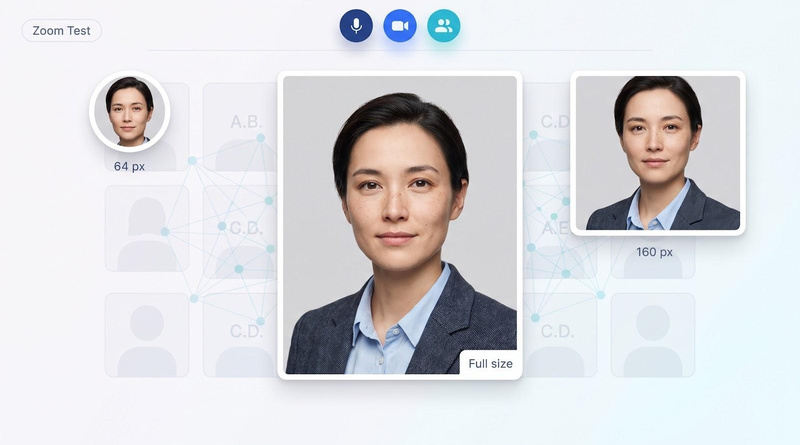
A LinkedIn profile with a photo can earn up to 21 × more views and 9 × more connection requests than a blank avatar. Yet the AI headshot that shines on a sales page often turns unfamiliar when Zoom shrinks it to a 64-pixel circle. We call that check the Zoom Test: does your face stay recognisable from thumbnail to full-screen? This guide compares today’s leading generators on likeness, keeper cost, speed, privacy, and team features so you can secure one believable, artifact-free headshot and get back to work.
The quick answer: which AI profile picture generator is best?
Looking for a keeper in minutes with zero risk? Magic Studio lets you preview 50 watermarked samples before you pay, so solo pros rarely waste a dollar. Rolling portraits out through HR? HeadshotPro layers SSO, SCIM, and a REST API on top of SOC 2 controls. Need premium realism on a tight clock? Aragon AI delivers polished images in about 30 minutes without enterprise pricing.
These three cover most buyers, yet four other front-runners shine in specific situations: single-photo touch-ups, 4K files with human retouching, budget-friendly bulk output, and strict EU data residency. The table below spotlights the seven core generators compared here; three specialty picks follow later.
| Rank | Tool | Best for | Starting price | Preview before pay | Typical turnaround |
| 1 | Magic Studio | Zero-risk previews for individuals | $59 | Yes (50 watermarked) | ≈ 15 min |
| 2 | HeadshotPro | Teams, API, SOC 2 buyers | $29 | No (refund guarantee) | ≈ 2 h ($29) to 15 min ($59) |
| 3 | Aragon AI | Fast premium realism | $35 (sale; list $44) | No | ≈ 45 min ($35) to 15 min ($75) |
| 4 | Headshots.com AI | One-photo enhancement | $50 per image | No (free revisions) | 3 business days |
| 5 | BetterPic | 4K files + human retouch | $35 | No | ≈ 2 h ($35) to 1 h (Expert) |
| 6 | The Multiverse AI | Budget-friendly bulk | $29.99 | No | ≈ 15 min |
| 7 | Profile Bakery | EU/Swiss team option + free preview | $24.90 | Yes (free demo) | 5 to 15 min |
How we evaluated each AI headshot generator
Before we ranked a single tool, we converted buyers’ real questions (“Will the photo still look like me at thumbnail size?”, “How many images will I actually use?”, “Where does my face data live?”) into seven weighted criteria grounded in current privacy law and platform specs.
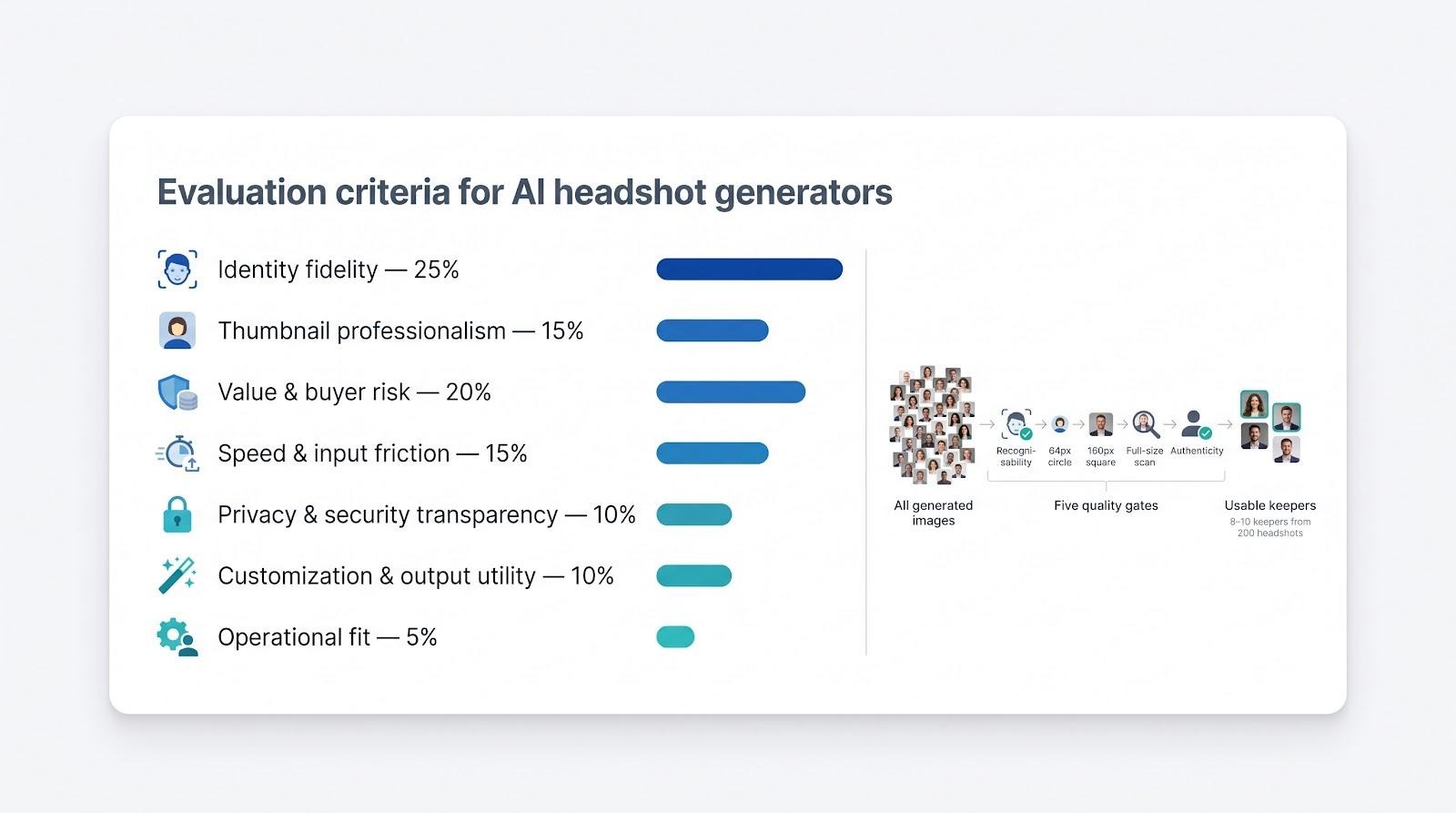
Identity fidelity (25 percent). Does the image still look like you when a colleague meets you on a call? Likeness drift is the top complaint in customer reviews, and LinkedIn requires profile photos to reflect the member’s actual appearance.
Professionalism at thumbnail size (15 percent). We judge vendor samples at a 64-pixel circle and a 160-pixel square, the exact avatar sizes Zoom and Teams show when video is off. Any halo, warped collar, or plastic skin costs points.
Value and buyer-risk protection (20 percent). A 200-image pack is meaningless if only two shots pass inspection. We divide package price by images that clear every gate and add bonus credit for free previews or simple refunds.
Speed and input friction (15 percent). A ten-minute turnaround from three selfies beats a two-hour wait with twenty uploads, especially for remote workers who need a photo before tomorrow’s meeting.
Privacy and security transparency (10 percent). We read the legal pages, not just the marketing copy, and lower scores for any service that keeps models longer than promised or trains on free-tier uploads.
Customization and output utility (10 percent). Higher scores go to tools that deliver 4K PNGs, preset backgrounds, clothing edits, or prompt-based fine-tuning.
Operational fit (5 percent). SSO, HRIS sync, API access, and accessible design matter most to HR and IT teams, so they earn a smaller but decisive slice of the score.
A photo counts as a usable keeper only if it clears five gates: recognisability, clean 64-pixel circle, artifact-free 160-pixel square, flaw-free full resolution, and accurate age, skin tone, and attire. If just eight photos survive in a 200-image pack, those eight are the real deliverable.
Finally, we rank evidence by source quality. Official pricing and legal documents come first; independent review platforms and side-by-side galleries follow. Brand-owned comparisons and Reddit threads expose failure patterns but never decide the winner on their own.
With that scorecard in place, we applied it to every major generator and surfaced the seven tools most likely to give you one believable headshot.
The 10 best AI profile picture generators for professional profiles
Here are the ten services that topped our Zoom-Test rubric, listed in rank order. Each mini-review shows where the tool shines, where it stumbles, and who should choose it first. Three bonus picks for free, mobile, and self-hosted workflows follow later in the article.
1. Magic Studio: best overall for preview-before-pay
Magic Studio tops our list because it removes the biggest risk in AI headshots: paying before you know what you will get.
The Magic Studio’s AI headshot generator asks for just ten well-lit selfies and then returns 50 watermarked previews you can scan pose by pose before spending a cent. Once you approve the results, one checkout unlocks either a standard 1,024-pixel set or a 4K premium pack, convenient for press kits and large banners.
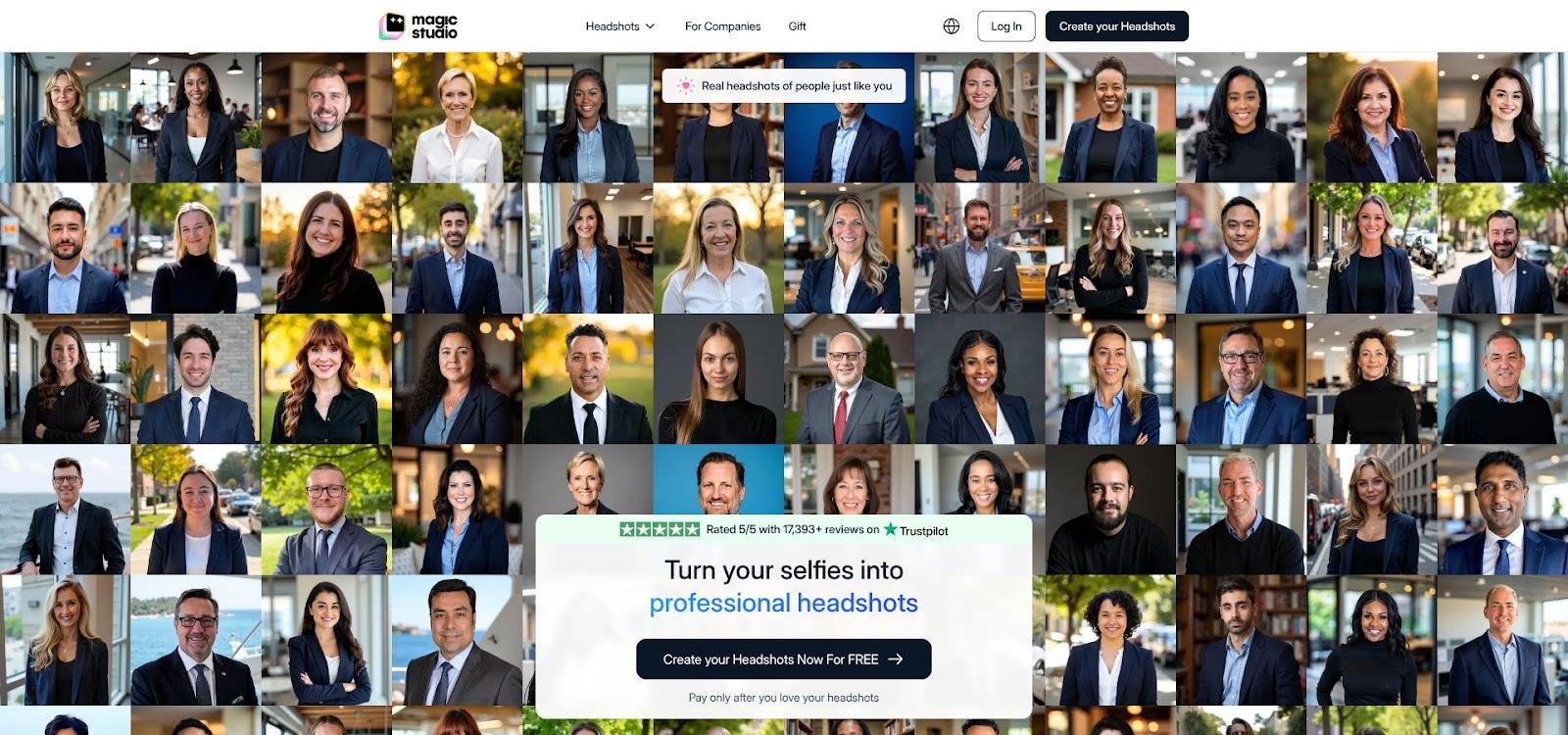
Magic Studio AI Headshot Generator Interface Screenshot
For a step-by-step look at the upload checklist, preview dashboard, and pricing tiers, explore the full workflow on the Magic Studio headshot page.
Most solo pros land a keeper in about 15 minutes. The software auto-sorts images into five “looks,” mixing blazer-formal and startup-casual shots without extra prompts. A built-in editor lets you adjust background colour, brightness, or retouch strength before downloading.
Pricing is straightforward: in the US, $59 buys three high-resolution files, $74 unlocks all 50 standard images, and $100 unlocks every file in 4K (prices vary by location). Because you preview first, the real cost per usable image often beats cheaper rivals that hide quality behind a paywall.
Privacy notes: the headshot page says models auto-delete after 30 days, and you can trigger manual deletion as soon as you save your files.
Trade-offs? You still need ten well-lit selfies, and the entry price is higher than HeadshotPro’s $29 tier. If you value speed, control, and zero purchase risk, Magic Studio is the safest first step.
2. HeadshotPro: best for teams, APIs, and compliance-minded buyers
HeadshotPro behaves more like an onboarding workflow than a one-off generator. Upload a few selfies, pick a style set, and receive 30, 50, or 70 headshots in about 2 hours, 30 minutes, or 15 minutes. Plans cost $29, $39, or $59, and the Executive option adds 4K output and the fastest delivery. Explore plan details on the HeadshotPro pricing page.
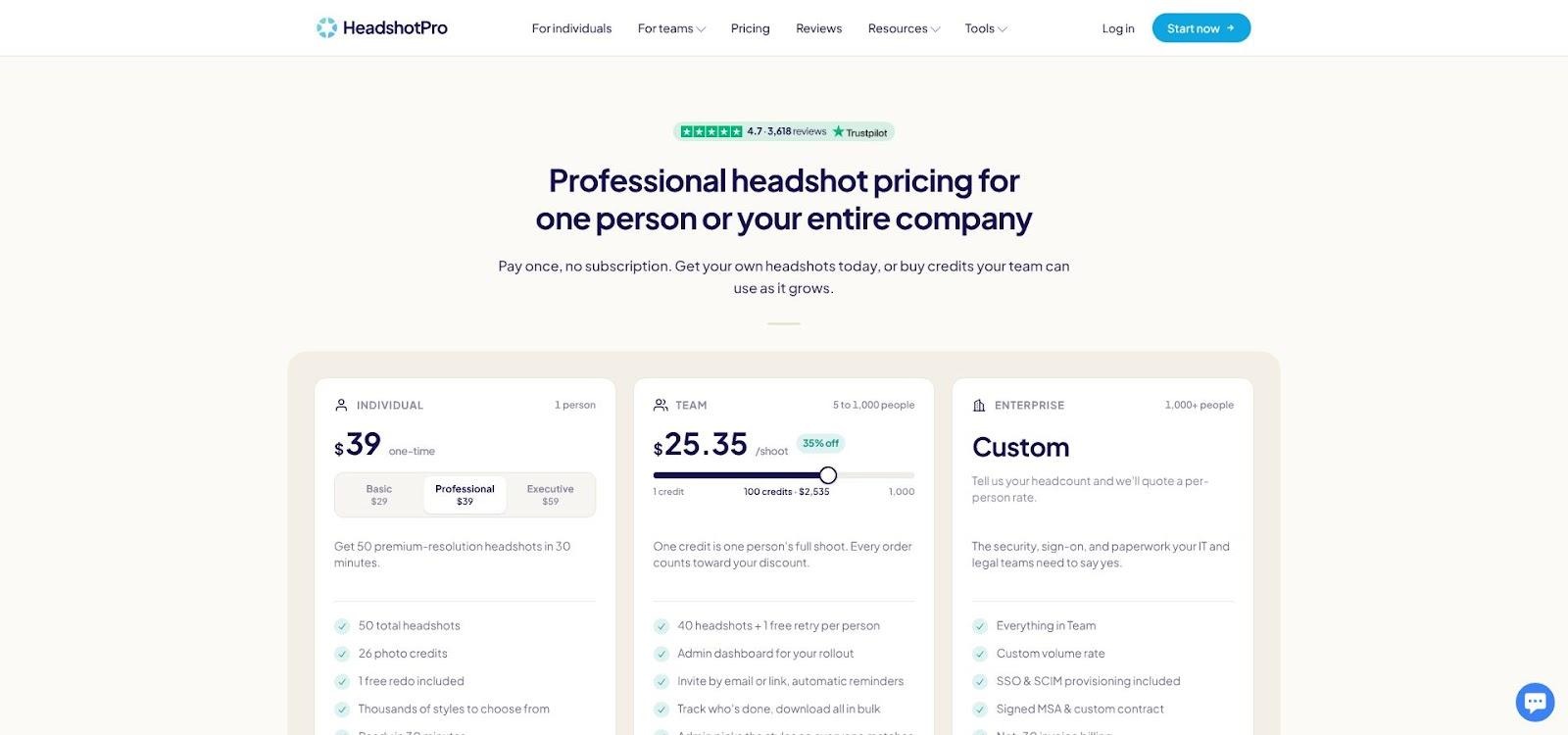
HeadshotPro Pricing and Team Workflow Screenshot
What makes HeadshotPro stand out is infrastructure. HR or IT teams can:
- Roll deployment company-wide through SSO and SCIM
- Sync new members in from most HRIS platforms through its Zapier app (there is no native HRIS connector)
- Retrieve finished files through the REST API, signed webhooks, or Zapier
A Zapier step can post each finished, on-brand portrait to Slack, so no email chasing is required. Compliance needs are covered as well: SOC 2 Type II, a signed DPA for GDPR buyers, and 30-day automatic deletion of uploaded selfies and generated results.
Buyer protection is strong. Every package includes one free redo within 60 days and a 30-day money-back Realism Guarantee, keeping the effective cost per keeper competitive with budget tools.
Trade-offs? 4K downloads are Executive-only, and you cannot preview the full set before paying. If you need a single headshot today, Magic Studio may feel safer. For HR teams managing dozens of employee profiles, or engineers who prefer an API call, HeadshotPro is the clear first choice.
3. Aragon AI: fastest route to premium realism
Need polished images in under half an hour? Aragon AI lets you upload a set of well-lit selfies, choose one of three packages ($35, $45 or $75 during a 20% sale; list $44, $56 and $94), and receive 40, 60 or 100 headshots in about 45, 30 or 15 minutes. See current plans on the Aragon AI pricing page.
Quality stands out. The Executive package exports files at 1,792 × 2,176 pixels, so skin texture and hair edges survive tight crops for conference badges or marketing one-sheets. Aragon’s AI Editor adds tools such as a background changer, pose editor and realism enhancer, useful for stray collar gaps or uneven lighting.
Privacy is clear: face data is deleted or anonymised within 30 days of delivery (active subscribers excepted), and Aragon contractually bars its AI providers from training generalised models on it. Teams get branded headshots and presets for a consistent look, although the feature set is lighter than HeadshotPro’s enterprise stack.
Trade-offs? Basic and Standard packages ship 896 x 1088 pixels, well below 2K. If you need 4K or unlimited tweaks, BetterPic or Magic Studio may fit better. For buyers who want premium realism at startup speed, Aragon AI is hard to beat.
4. Headshots.com AI: best for one-photo enhancement
Already have a decent selfie but need studio polish? Headshots.com AI lets you upload a single photo, pick from a series of AI likenesses generated from that one upload (under 30 seconds of your effort), and get a hand-finished file within its stated 3-business-day turnaround at $50 each ($40 each from the 101st). No batch fee, no model-training wait, and no folder of near duplicates you will never use.
Because the service enhances an existing image rather than generating a new face, likeness stays solid: glasses, freckles, and subtle asymmetries all survive the clean-up pass. Its editors then hand-edit each image for lighting, colour, tone and framing, and if you are not happy, its Happiness Guarantee covers a free revision, retouch or replacement.
For solo professionals, the pay-per-image model keeps costs predictable: you pay only for the portraits you order, with no bundle to buy. Need two variants for conference programs? Download two and move on.
Caveats: you will not get a full library of new poses, and turnaround is days rather than minutes. On privacy, its policy says images and working files are deleted one month and one day after delivery and are never used to train AI models.
When time is tight and your camera roll already holds a well-framed head-and-shoulders shot, Headshots.com AI delivers careful, hand-finished polish for that single, all-important avatar.
5. BetterPic: best 4K output with optional human retouching
Need print-ready resolution? BetterPic provides 4K files on every plan, starting at $35 for 20 images. Fine hair strands and fabric textures stay crisp even after tight cropping. Move up to the Expert tier for 120 images, unlimited human edits on one photo and one free redo, useful for taming flyaway hairs or softening stubborn shadows without opening Photoshop.
The gallery leans business-formal: clean studio lighting, neutral backdrops, and classic blazer-over-button-down looks. Training on 8 to 12 selfies keeps likeness steady, although the 120-image bundle may include a few poses that miss the brand vibe. A filter lets you star favourites and hide obvious rejects, so the real keeper count stays high despite the volume.
Value improves with the redo and human-edit options. If the first batch misses the mark, a redo costs $10 (free on Expert). Need a collar tweak? Human edit requests cost $8 each.
Privacy caveat: the pricing page says your uploads train only your own model and can be deleted on request, yet the legal policy allows photos to stay up to one year and models up to three years for quality control. If strict timelines matter, request explicit deletion once you download your files.
BetterPic performs best when your headshot will live beyond LinkedIn: press kits, keynote speaker bios, or high-end marketing decks where resolution adds real credibility. Read the fine print before you upload.
6. The Multiverse AI: best budget-friendly bulk
Need a mountain of images on a startup budget? The Multiverse AI charges $29.99 for roughly 100 standard headshots plus 20 prompt-based custom images, a yield no other mainstream tool matches at this price.
Speed keeps pace. About 10 to 15 minutes after you upload 12 to 15 photos, your dashboard fills with business-casual poses, varied backdrops, and a few playful colour options. A built-in Magic Edit lets you adjust background hues or swap a blazer for a cardigan, so you are not stuck with the first draft.
Transparency is another win. The privacy page states that uploads, personal models, and outputs auto-delete 90 days after your last purchase and that your selfies are never used to train general-purpose models; data is stored in the EU and processed in the U.S. In a market where marketing copy often contradicts legal text, that clarity stands out.
The trade-off is consistency. Independent reviews praise cost per keeper but note minor likeness drift: slightly narrower eyes here or an off-angle jawline there. Its homepage also makes no refund promise for individual orders, so read the terms before you buy.
For creators who need fresh content monthly or startups rotating LinkedIn banners every quarter, The Multiverse AI offers high-volume output at a price finance teams can support. Plan a few extra minutes to sift for the true keepers among the generous set.
7. Profile Bakery: best GDPR-minded data control with a free preview
Need GDPR-minded handling without a long queue? Profile Bakery is a Swiss company that stores data in Frankfurt, deletes demo photos after about 48 hours and generated images after 30 days, and says photos are never used for AI training. For private customers the AI processing itself runs through US providers; business customers can choose a local variant processed in the EU/EEA or Switzerland (privacy policy checked 11 Nov 2026). View current plans on the Profile Bakery pricing page.
The flow starts with one selfie. A free preview arrives in about two minutes with no signup, and paid packages are ready in 5 to 15 minutes. Plans cost $24.90 for 30 images, $29.90 for 60 and $49.90 for 120, with a free redo if you are not satisfied. Because you sample quality first, you pay only after confirming likeness and style.
Outputs lean “approachable expert”: soft natural light, muted backdrops, and smart-casual attire. An included image editing tool adjusts makeup, hair and figure, and every generated image carries C2PA metadata for AI labelling.
Teams get a separate business offer with a data processing agreement, an HR dashboard and a consent step before employees upload, letting mid-size firms standardise portraits without booking studio shoots.
Drawbacks? Like any one-selfie generator, it can drift on likeness, and the US processing for private orders may not satisfy strict data-residency rules unless you use the business variant.
For European startups or global companies with strict data-residency clauses, Profile Bakery offers a mix of no-risk previews, clear deletion clocks, and turnaround times that compete with faster U.S. providers.
8. StudioShot: best included human retouching
Need AI speed and a human eye? StudioShot charges $29.25 for 40 images, $36.86 for 80, or $43.88 for 120 (discounted from $38.90, $49.02 and $58.36). Plans include up to 2, 4 or 6 free retouches, perfect for softening harsh shadows, straightening collars, or taming flyaway hairs after the AI pass. See full details on the StudioShot pricing page.
Turnaround is under 3 hours on Essential, under 2 on Pro and under 1 on Signature (pricing page checked 11 Nov 2026), and the page adds a 100% money-back guarantee. Styles lean corporate classic: solid backgrounds, balanced three-point lighting, and jackets that fold where real fabric should.
Privacy terms promise no model training without consent, yet data remains while your account is active and may take up to 45 days to delete. If you need a tighter window, schedule a manual purge once your retouched files arrive.
Drawbacks stay modest. The initial AI batch can feel stiff, and retouch requests add time to true turnaround. If you want to skip Photoshop and land a magazine-ready portrait, StudioShot is one of the few generators that bakes human finesse into every package without an upsell.
9. HeadshotPhoto.io: best transparent deletion schedule on a budget
Need a documented deletion clock without a premium price? HeadshotPhoto.io spells out its terms up front: its privacy policy says training photos are deleted within seven days after your headshots are generated and are never used to train its AI models, and you can delete generated headshots from your account at any time. That clarity builds instant trust with privacy-conscious freelancers and small teams. See details on the HeadshotPhoto.io pricing page.
Pricing stays friendly: $34 buys 40 headshots in about 3 hours, $39 doubles the output to 80 in about 2 hours, and $59 unlocks 100 images in about 1 hour plus one free reshoot (homepage checked 11 Nov 2026). Upload eight selfies and browse a gallery that blends conservative business looks with lighter social media backgrounds.
Every plan includes edit credits (5, 10 or 20) to swap backgrounds, change outfits, upscale or expand images after generation, drawing on 120+ backgrounds and 60+ outfit styles, a useful perk at this price.
Two caveats remain. Turnaround runs from one to three hours depending on the plan, and, as with any generator, skin tone or glasses alignment can drift. If you face a hard deadline, add buffer time and use evenly lit selfies to improve accuracy.
For buyers who prioritise a firm deletion schedule over polished marketing, HeadshotPhoto.io balances cost control with data hygiene.
10. Dreamwave: best privacy-first team automation
Think of Dreamwave as an HR workflow, not a pop-up photo booth. Individuals upload one selfie, wait about two hours, and receive a gallery that ranges from business-formal to startup-casual. Teams can go further: HR connects Dreamwave to Workday, ADP, Rippling, Gusto or BambooHR, and new-hire portraits flow to Slack, Outlook, Okta and badging automatically. See how it works on the Dreamwave pricing page.
Why compliance teams lean in
- Your likeness is never used to train future AI models
- Data stays on U.S. servers
- Personal data deleted by default after 30 days of no use
- Payments through Stripe, with no card details stored
Quality and editing
Images clear the Zoom Test: natural skin texture, straight glasses, and backgrounds that respect LinkedIn’s tight crop. A built-in editor swaps outfits and backgrounds, a magic eraser polishes details, and a pro retouching team handles small tweaks, saving marketing an extra step.
Watch-outs
Dreamwave’s no-refund policy activates as soon as generation starts, so double-check your selfies. Most of its published reviews sit on its own site; if you need extensive independent consumer feedback, consider Magic Studio or HeadshotPro instead.
For organisations that want data control without building an in-house photo stack, Dreamwave delivers a privacy-forward pipeline that can scale from intern to CEO and stay within compliance boundaries.
Specialty picks: free, mobile, and open-source options
Best free DIY generator: Adobe Firefly
Want a headshot with $0 upfront cost? Adobe Firefly lets you upload one reference photo, describe the look (for example, soft studio light with a navy blazer), and receive a high-resolution PNG in seconds. Adobe says its Firefly models are trained on licensed content and come with built-in Content Credentials, making disclosure on LinkedIn simple. Firefly works inside the Creative Cloud workflow: export to Photoshop or Express, crop, and post. Free daily generations suit casual users, while the US$9.99-a-month Firefly Standard plan adds 2,000 monthly credits and unlimited standard image generations (plans page checked 11 Nov 2026). Limits include no 40-pose gallery, and prompt crafting takes practice.
Best free real-photo enhancer: PFPMaker
Already like your selfie but dislike the busy café backdrop? PFPMaker’s free classic maker swaps it out, with about 15 seconds of average processing time according to its homepage. Upload one image, pick a clean colour or photo backdrop, and download the result; the site says you can start free with no credit card, and it removes uploaded photos automatically every 24 hours. Because the classic tool keeps your own photo rather than inventing a new face, likeness stays close to the original. Trade-off: a new background does not fix a blurry or badly lit selfie, so start from a sharp, well-lit shot.
Best reusable content studio: Photo AI
Need fresh portraits every month? Photo AI’s Starter plan costs $19 per month ($9 a month billed yearly) and includes one personal AI model a month, so you can generate new headshots and lifestyle scenes on demand. AI videos and the Magic upscaler come with the $99-a-month Max plan (pricing page checked 11 Nov 2026). Downsides: there is no pay-once option, and large teams may miss comforts like SSO. For founders or creators who update banners, newsletters, and thumbnail-heavy channels weekly, Photo AI offers a flexible, always-ready studio.
What it means to pass the Zoom Test
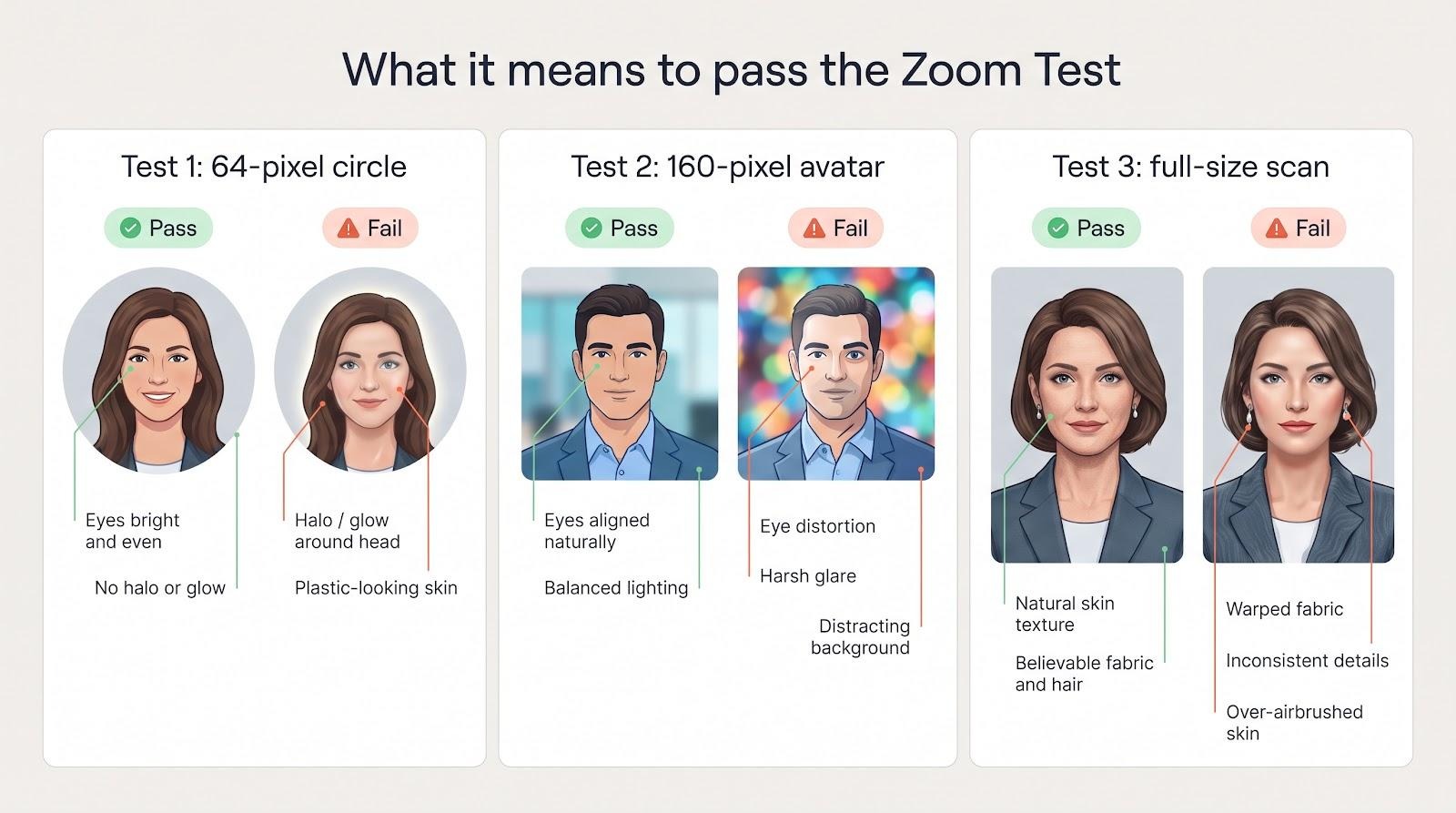
Test 1: the 64-pixel circular crop
On a vendor’s site, a headshot looks generous. Shrink it to a 64-pixel circle, the size Zoom shows beside a muted mic, and tiny flaws stand out. We check three things:
- Eyes stay bright and evenly sized.
- Skin texture still reads as human, not plastic.
- Background stays calm; halos or gradients distract.
Most AI models train on large glamour shots, so pupils blur, glasses jitter, or a faint glow appears at this size. Magic Studio and HeadshotPro clear this gate almost every time; budget tools can too, but you will sift harder. Always preview thumbnails before you commit to a new profile photo.
Test 2: the 160-pixel video-call avatar
Clear the tiny circle and your image moves to Zoom’s 160-pixel square, the face colleagues see when your camera is off. Here we ask:
- Are both eyes aligned naturally, free of lens distortion?
- Is the lighting balanced, without harsh glare or deep shadows?
- Does the collar lie flat and symmetrical?
- Is the background calm, not a neon bokeh that feels like stock art?
Magic Studio, HeadshotPro, and Aragon usually pass. Value brands like The Multiverse AI can too, if you hunt for the right frame. Spend 40 seconds previewing each candidate in Zoom’s profile settings to avoid a crooked lapel mid-meeting.
Test 3: full-size inspection and the authenticity gate
If an image clears both crops, zoom to 1,024 pixels or higher for a final scan:
- Look for seams, mismatched earrings, painted-over eyes, warped jacket fabric, or the rare six-finger glitch.
- Confirm authenticity: age, skin tone, hairstyle, facial hair, and cultural markers (hijab, natural curls) must match reality. An AI that quietly removes ten years will betray you when you appear on camera.
Most generators now handle skin and eye detail well, but clothing artifacts still slip through. Download two flawless keepers instead of 40 almost-good shots that crack under scrutiny; the minute you spend here saves an awkward “You don’t look like your photo” moment later.
Which generator should you choose for your role?
Every profession sends a distinct visual cue. A venture capitalist expects crisp studio light, while a UX designer might favour a playful palette, and a hospital recruiter trusts subdued tones over nightclub neon. Use the pairings below as a starting point, then weigh timeline, privacy comfort, and budget, because one believable image in the right style beats any 200-photo bundle that misses the vibe.
Job seekers and career changers
Applicant-tracking systems (ATS) and LinkedIn thumbnails reward clarity. Magic Studio lets you preview the entire batch before paying, so a limited budget goes straight to a keeper that looks like you on day one.
Executives, founders, and public-facing sales pros
Brand consistency matters more than raw output count. HeadshotPro locks backgrounds, suits, and lighting across a leadership page and pipes files to marketing through its API. SOC 2 paperwork reassures compliance teams when you court enterprise buyers.
Remote and hybrid teams
HR needs portraits live before the first Slack welcome. HeadshotPro delivers again, thanks to automatic invites and reminders, SSO provisioning, and Zapier-based HRIS sync that cut manual follow-ups.
Real-estate agents and client-facing consultants
Print materials demand high resolution. BetterPic supplies 4K files plus optional human retouching, keeping yard signs and billboard banners sharp.
Lawyers, doctors, and regulated professionals
Trust rests on restraint. Choose Headshots.com AI or Profile Bakery to polish an existing photo instead of generating a new face. Results feel authentic under courtroom fluorescents, and Profile Bakery’s business variant processes photos in the EU/EEA or Switzerland for strict data-residency clauses.
Creators and personal-brand builders
Content never sleeps. Photo AI trains a reusable personal model, so you can produce headshots, lifestyle scenes, or (on its Max plan) short video clips on demand, perfect for weekly newsletters and thumbnail-heavy channels.
Privacy, AI labels, and who owns your face data
A quick upload-download cycle feels harmless, yet your selfies often linger long after you close the browser. Many vendors promise 30-day deletion, but their legal pages sometimes let models stay months longer for “quality improvement.” Before you pay, skim the privacy policy (not just the marketing copy) and note three separate clocks:
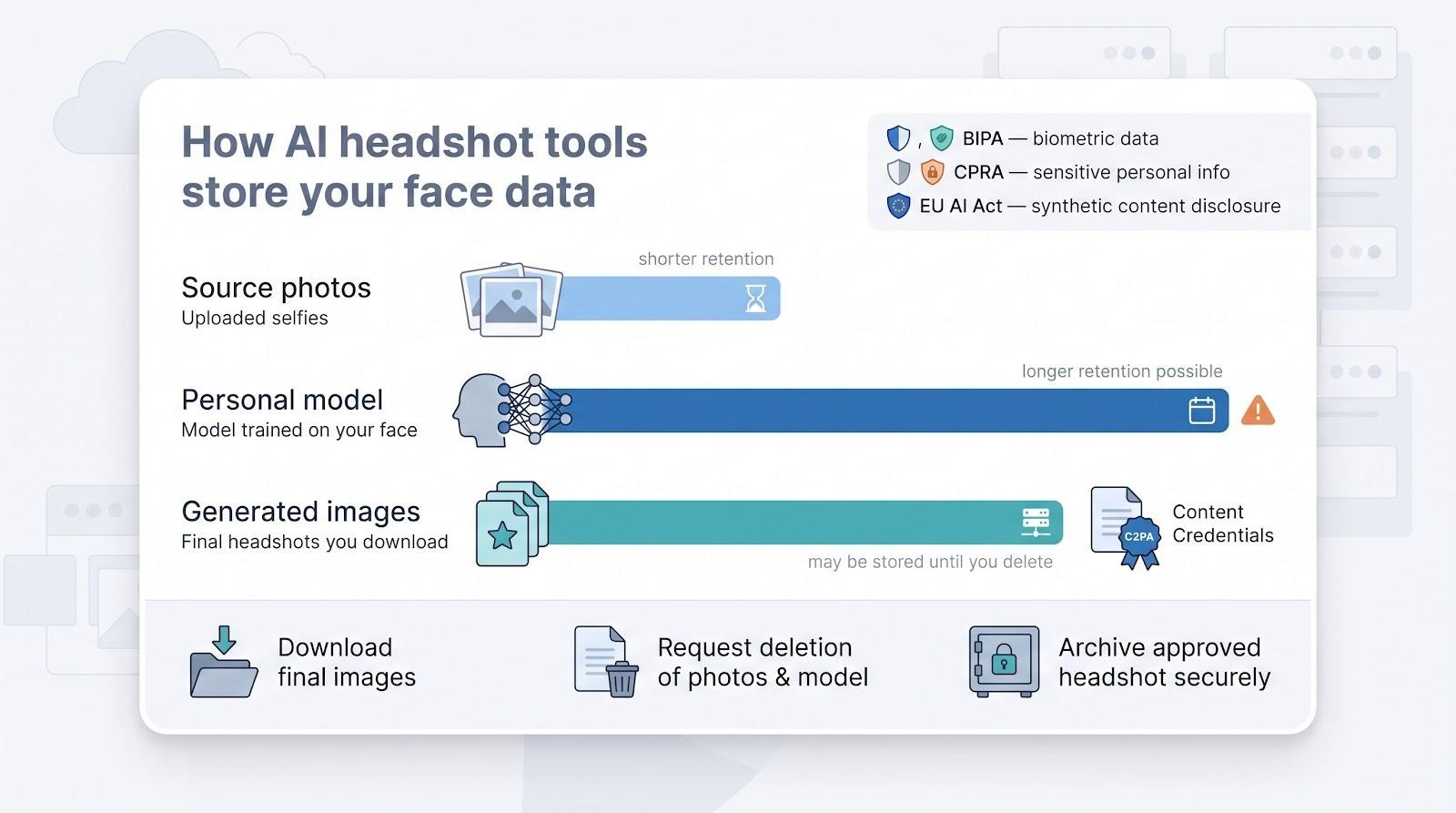
- Source-photo deletion
- Model deletion
- Generated-image retention
Why the fine print matters
- Illinois BIPA treats face geometry as biometric data, carrying statutory penalties for misuse.
- California CPRA labels biometrics “sensitive personal information.”
- EU AI Act Article 50 requires clear disclosure when synthetic content reaches end users.
If a service stores your images in the wrong jurisdiction or trains future public models on them, liability may follow you, not just the vendor.
Provenance and invisible watermarks
LinkedIn is rolling out C2PA (Coalition for Content Provenance and Authenticity) labels, while Adobe, OpenAI, and Google already embed invisible watermarks in generated files. Tampering with that metadata can violate platform terms or local transparency laws. Keep the tag intact when you publish a headshot.
Free tiers vs. paid plans
Free tools and paid packages do not always share the same terms, so check what a free tier lets the vendor do with your uploads. To experiment without risk, use a service that offers watermarked previews without surrendering training rights, or choose Adobe Firefly, whose models Adobe says are trained on licensed content.
Take control: privacy is proactive
- Download final images as soon as they are ready.
- Request early deletion of source photos and the personal model.
- Archive the approved headshot in a secure, version-controlled folder.
A polished portrait is valuable only if a dormant clone of your face is not still refining someone else’s algorithm in a distant data centre.
AI headshot vs. professional photographer: when the real lens still wins
AI delivers speed, scale, and impressive likeness, making it ideal for LinkedIn, Slack, internal directories, or a conference bio you need today. A believable headshot that costs less than $70 and arrives before lunch can outperform waiting weeks for a studio slot.
But some moments still call for a human behind the lens:
- Editorial or national-press portraits demand nuanced lighting, on-site storytelling, and art-director collaboration that AI cannot replicate.
- Book jackets, billboards, or investor decks require consistent colour grading across multiple subjects and locations.
- Annual-report executives benefit from real-time posing guidance; a photographer captures the micro-expression that says “confident leader.”
- Regulated fields such as healthcare or finance may need iron-clad provenance and signed releases that AI vendors cannot yet provide.
- Cultural expectations in some markets still view an in-person shoot as a sign of commitment and professionalism.
Factor in wardrobe styling, human retouching, and the hours spent sifting through 200 AI variations, and the cost gap narrows. A two-hour on-site session can deliver half a dozen print-ready shots with zero artifact anxiety.
Use AI for speed and experimentation, and book a photographer when narrative, nuance, and unquestioned authenticity carry real business weight.
How to get more realistic AI headshots from any tool
A great generator sets the stage, but your inputs still steer the result. Follow the checklist below to raise keeper rates, whichever service you choose.
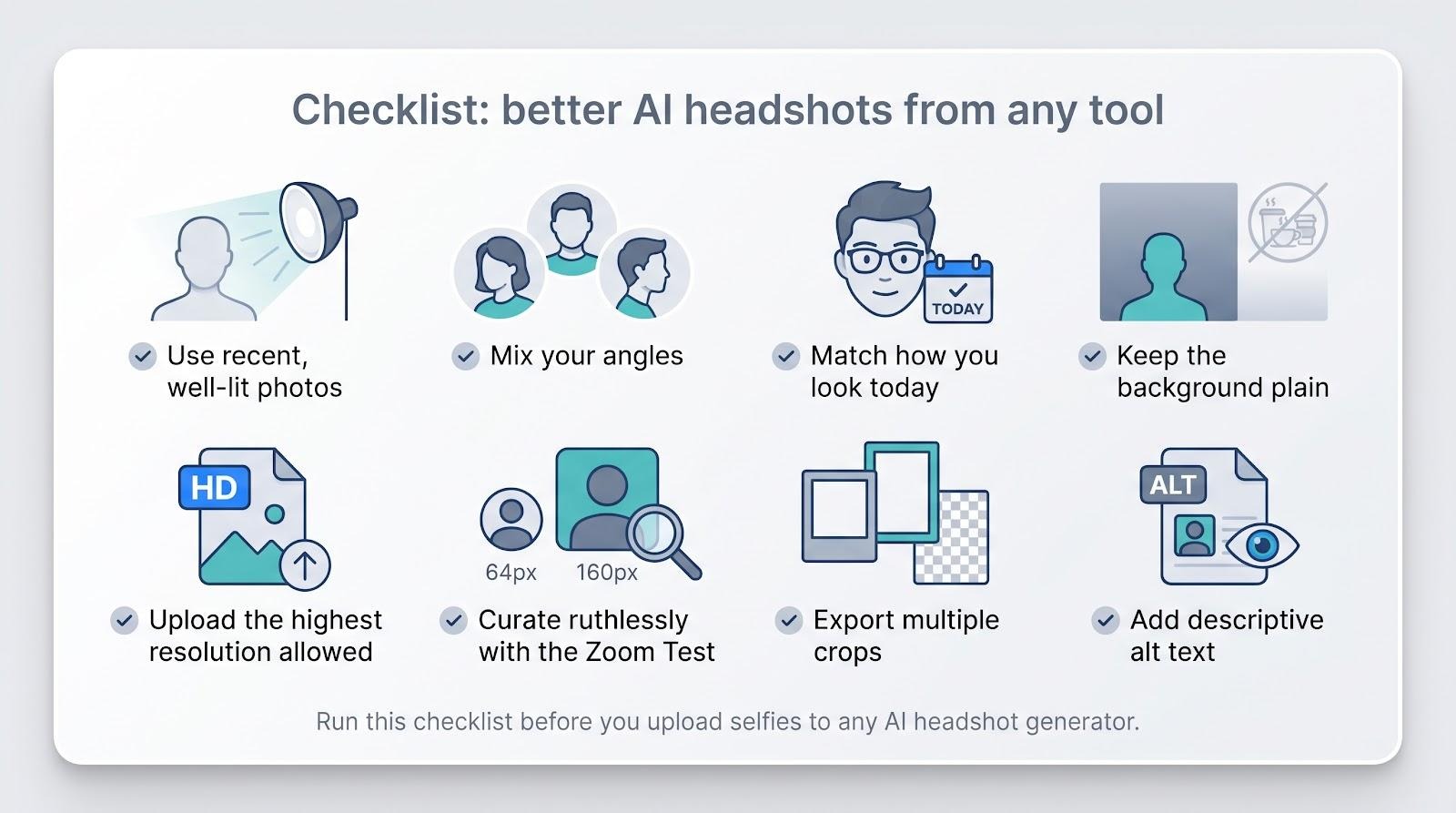
- Use recent, well-lit photos. Natural window light or a soft-box lamp removes harsh shadows that models misread as wrinkles. Hold the phone at eye level, clean the lens, and skip beauty filters; they hide the micro details the algorithm needs.
- Mix your angles. Capture one straight-on shot, a gentle three-quarter turn, and one profile slice. Slight differences help the model map real bone structure instead of collapsing your face into perfect, yet uncanny, symmetry.
- Match how you look today. If you wear glasses in meetings, keep them on. Do the same for current hair length, facial hair, natural curls, or religious head coverings. Consistency prevents mismatched outputs.
- Keep the background plain. A white wall or lightly textured office corner keeps attention on you. Busy café scenes add halos, colour noise, or unwanted objects.
- Upload the highest resolution the platform allows (check the tool’s spec page) but stay under the file-size limit. More pixels preserve skin texture; oversized files only slow training.
- Curate ruthlessly. Short-list images that feel instantly familiar, then run each through the Zoom Test: 64-pixel circle, 160-pixel square, full-size scan. Delete the rest so you are never tempted to post a merely passable substitute.
- Export multiple crops. Save square, portrait, and transparent-background PNGs so the same trustworthy face fits LinkedIn, email signatures, and conference one-sheets without stretching.
- Add alt text. When you upload the final headshot to LinkedIn or your website, include descriptive alt text for screen-reader users and stronger SEO.
Treat this as a ten-minute pre-flight check. A little prep now means your first preview already looks like the best version of you.
Frequently asked questions
What is the most realistic AI profile-picture generator?
Realism equals likeness plus freedom from thumbnail artifacts. In published reviews and our desk scoring, Magic Studio and HeadshotPro lead both metrics: they train on enough source photos to preserve bone structure, then apply light retouching so skin still looks like skin, not plastic. Preview every candidate at 64- and 160-pixel sizes before posting; that one-minute check beats any marketing claim.
What is the best free professional headshot option?
If “free” means $0 and no watermark, Adobe Firefly wins. One reference image and a short prompt can yield a high-resolution PNG in seconds. Prefer to enhance an existing photo? PFPMaker’s free classic maker puts your own selfie on a clean background, with no credit card needed.
Are AI-generated headshots allowed on LinkedIn?
Yes. LinkedIn focuses on authenticity, not the underlying tech. The platform says members with a profile photo receive up to 21× more views and 9× more connection requests than blank avatars. Make sure the image still looks like you; misleading photos risk account flags.
Can recruiters tell a photo was generated by AI?
A 2024 study by Ringover found recruiters could accurately identify AI headshots only 39.5 percent of the time. Most managers notice only when a headshot looks too perfect, such as plastic skin, mirrored eyes, or unnatural depth of field. Keep slight imperfections and you will stay under the radar.
How many selfies should I upload?
Follow the tool’s latest guidance. Magic Studio suggests 10 varied shots, HeadshotPro asks for a few, and Headshots.com AI needs only 1. More is not always better: 20 near-identical selfies can reduce likeness fidelity.
Is 4K resolution necessary for LinkedIn or Zoom?
No. LinkedIn shows profile images at 400 × 400 px, and Zoom displays a 160-px square when your camera is off. Anything above 1,024 px future-proofs for print; 4K helps only for large banners or magazine spreads.
Should I place an AI headshot on my résumé?
In the United States most recruiters prefer résumé files without photos to limit bias. Use the headshot on LinkedIn, email signatures, or speaker bios instead. In many EU countries, where résumé photos are common, add a brief disclosure that the image was AI generated.
Are my selfies used to train future AI models?
Policies differ. Magic Studio and HeadshotPro pledge no general-model training, and BetterPic says uploads train only your own session model. Always review the privacy page and request deletion once you download your files.
Do I need to disclose that the headshot is AI generated?
No U.S. federal rule requires it today, but the EU AI Act and several state laws trend toward transparency. LinkedIn is already testing C2PA labels for synthetic images. If your field prizes authenticity (law, healthcare, or finance), label the image before anyone asks.
How often should a professional headshot be updated?
Refresh whenever your appearance changes in a way colleagues would notice during a call: a new hairstyle, significant weight change, new or removed glasses, or different facial hair. For most people that is every 18 to 24 months. With AI generators, err on the side of staying current.
Conclusion
One believable headshot beats a folder of almost-there images. Identify your top priority: speed, privacy, budget, print-ready resolution, or automated team rollout, then pick the tool that meets that need.
- Zero-risk preview and a keeper before lunch? Magic Studio.
- Employee portraits plus compliance paperwork? HeadshotPro.
- Premium realism on a tight clock? Aragon AI.
- Enhance one great selfie? Headshots.com AI.
- Need 4K files or human retouching? BetterPic or StudioShot.
- Strict data-residency rules? Profile Bakery or Dreamwave.
- Watching every dollar? HeadshotPhoto.io.
- High-volume content pipeline? The Multiverse AI.
Whichever path you choose, run the image through the Zoom Test: 64-pixel circle, 160-pixel square, and full-size scan. If the face still looks like you at every scale, you have found the keeper that will introduce you before you say a word.